CA ERwin MM provides a multiuser modeling environment that makes coordinated, large-scale modeling possible. It enables collaboration among project managers, data modeling team members, process modeling team members, and standards administrators by providing workgroup modeling services, including conflict resolution, versioning, security, and standards management. You can coordinate the efforts of model teams to document existing systems, create new eBusiness systems, and drive data standardization. Model sharing encourages teamwork, so modelers can work together more efficiently to optimize model-based development. Your modelers get more work done in less time with better results.
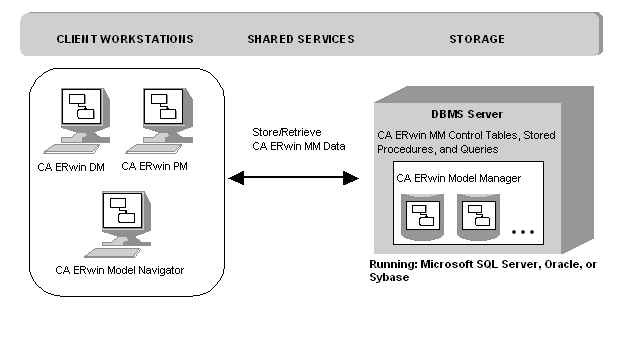
Workgroup modeling operates in a client/server environment so processing is shared between the user client workstation and the server where the models are stored. Users access the stored models through one of the clients-CA ERwin Data Modeler or CA ERwin Process Modeler. Models are held in a platform and network independent database or mart that resides on a central server, using Microsoft SQL Server, Oracle, or Sybase as the host database.
The following diagram shows a typical CA ERwin MM environment:
Workgroup modeling features are provided to help control updates to models when you are opening, closing, and saving models. The administrator installs the program and initializes the database on the DBMS server. The administrator also has the responsibility of setting up the library structure in which models are organized, and assigning security profiles to users. Administration overhead is relatively low and proportional to the number and activity level of the users. After a model is saved to the database, control of who can work on the model and how changes are saved to the model is handled by security, making it possible for workgroups to work on large models without confusion. CA ERwin MM supports many security and administrative features related to its multiuser capabilities and the client/server environment in which it operates. For this reason, routine management is usually performed by a dedicated administrator. Administrators can find detailed information regarding their tasks and responsibilities in the Administration Guide.
You can also use CA ERwin Model Navigator as a client. Read-only access is permitted to data models and process models, so your workgroup can use CA ERwin Model Navigator to share information with others without the risk that unauthorized changes might be saved to the mart. Additionally, you can connect to the mart through the Naming Standards Editor or the Datatype Standards Editor.
| Copyright © 2011 CA. All rights reserved. | Email CA Technologies about this topic |