

|
|
|
このセクションでは、データ行をフィールドに分割する方法およびフィールド タイプや形式など、データ ソースから取得したデータの構造を指定します。 初期データ フィルタリングおよびデータ操作は、InputFormatSwitch フィールドおよび Compound フィールドをそれぞれ使用して、このセクションで実行される場合があります。
このセクションの一般的なワークフローを以下に示します。
InputFormatCollection ノードには 1 つ以上の InputFormat ノードが含まれていることがあります。
XML 構造:
<InputFormatCollection>
	<InputFormat InputFormatName="MyInputFormat">
	<InputFormatFields>
		<InputFormatField Name="sid_id" Type="string"/>
		<InputFormatField Name="content" Type="string"/>
		<InputFormatField Name="date" Type="time"
               TimeFormat="%d/%m/%Y %H:%M:%S"/>
		<InputFormatField Name="server" Type="string"
               Source="compound">
		<Compound>
			<Segment SourceField="content"
                     RegularExpression=".*Job server: ([^\n]+).*" />
		</Compound>
		</InputFormatField>
	</InputFormatFields>
<TranslatorSwitch DefaultTranslator="GeoTranslator">
	<TranslatorCase  TranslatorName="NonGeoTranslator" Break="yes">
		<Condition SourceField="routing_info" Operator="EQ"
             Value="cnano"/>
	</TranslatorCase>
</TranslatorSwitch>
</InputFormat>
</InputFormatCollection>
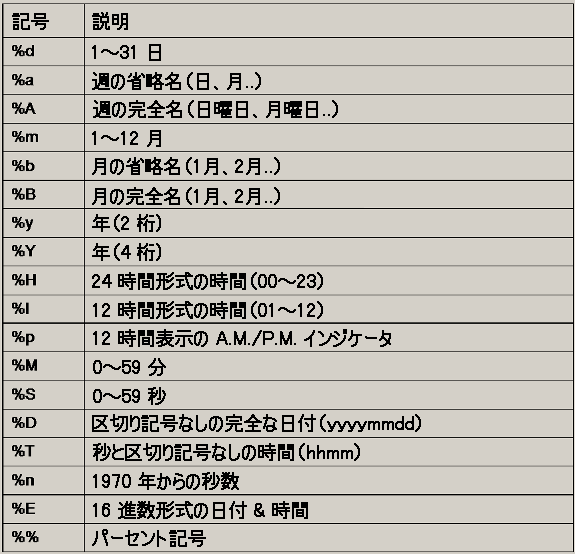
	<InputFormatField Name="timestamp" Type="time"
	TimeFormat="%d/%m/%Y %H:%M:%S"/>
注: InputFormatSwitch を使用する場合、InputFormat ノードの順序が重要です。参照される InputFormat はすでに定義されている必要があります。
DefaultInputFormat - 一致する条件がない場合に適用される InputFormat の名前を指定します。
SourceField - テストするフィールド。
Operator - テストのタイプ。以下のオプションがあります。
ValueType - (オプション)[constant/field/previousValue]
Value - マッチングする値、または正規表現。
MatchCase - (オプション)[yes/no]。テストで大文字と小文字を区別するかどうかを定義します。 「yes」に設定すると、マッチング対象の 2 つの値はテストの前に小文字に変換されます。
Break[yes|no]
yes - (デフォルト)条件が一致する場合は、次の条件をチェックしません。
no - 常に条件を評価し、一致した場合はトランスレータを適用した後に、次の条件に進みます。
LogicOperator - (オプション)[and/or]。
TranslatorName - 条件を満たした場合にリダイレクトされるトランスレータ。
Condition - 使用する適切なトランスレータを判断するために、処理対象のデータでテストされる条件。 InputFormatSwitch の条件と同じです。
| Copyright © 2012 CA. All rights reserved. | このトピックについて CA Technologies に電子メールを送信する |