

|
|
|
Custom attributes and parameter are <isn> entities. They both represent a common data entry related to a number of other <isn> entities, such as: Contracts, Service Definitions, Resources, etc. This chapter describes the Launcher Page. Launcher Pager, in this sense, refers to having an extra button to the right of a customizable entity. Upon clicking this button, a modal dialog opens, displaying a customer crafted page that eases the value selection for that entity.
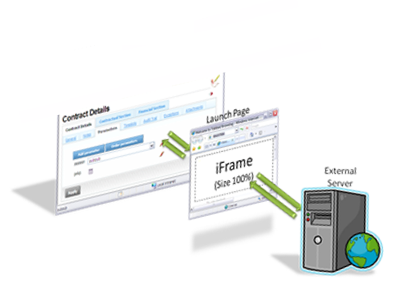
The launch page consists of an HTML page with an iFrame, pointing to a page from any URL declared in the CA Business Service Insight configuration. This enables displaying an external page with deployment-specific data (e.g. user list from Active Directory).
CA Business Service Insight passes a JavaScript object as an argument to the launch page. This object is available to the iFramed page. After calling the server, this external page updates the JavaScript object as needed, passes it to the launch page and sends it back to CA Business Service Insight for control update.
The figure below indicates a component diagram of the Launcher Page.
| Copyright © 2012 CA. Tutti i diritti riservati. | Contatta CA Technologies |