

|
|
|
The following image illustrates the internal event flow in the SSO integration process.
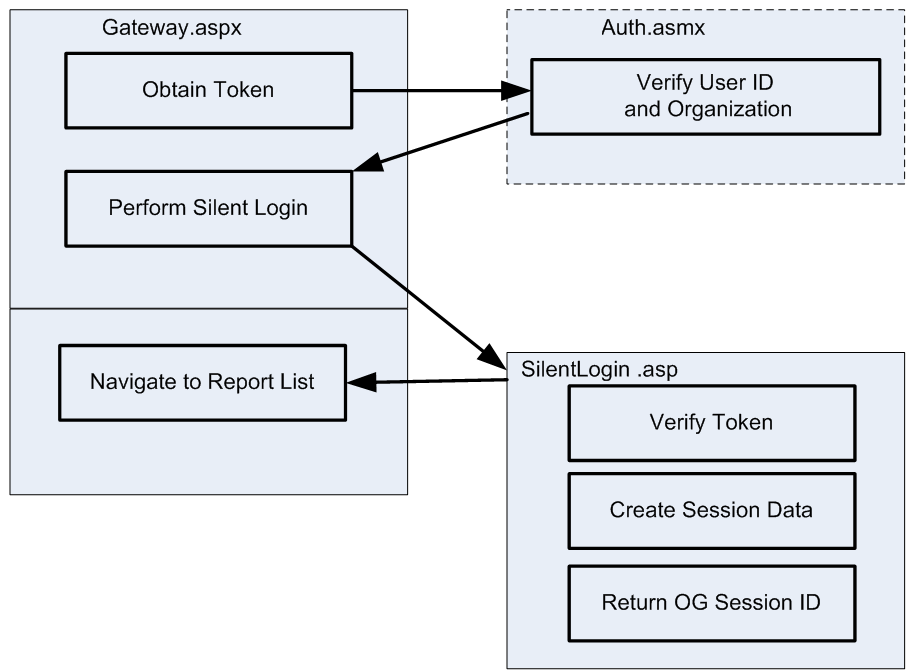
Once a user signs-on to the portal, SSO checks the user credentials against the CA Business Service Insight database, ensuring secure access to Insight. This is done using the Gateway.aspx, which resides on the portal Web server, in the CA Insight Portal Client virtual directory.
Gateway.aspx:
The Insight/Web Services directory is configured on the CA Insight Web server as accessible only from portal IPs using IP Address and Domain Name Restrictions on IIS.
Auth.asmx checks if a user with such credentials (user name and organization) exists and is active in the CA Insight database. If such a user exists, a special encrypted token containing the user ID is returned and a timestamp is issued. If no such active user exists, a null token is returned.
SilentLogin.asp (part of the CA Business Service Insight installation) verifies the token and navigates to the report list (or other portal content), creates session data and context, and returns an CA Business Service Insight Session ID. If the token is obsolete or incorrect, it returns an error message.
To implement SSO, Insight inherits the user name and organization from an organizational Identity Management Solution (IMS) such as the Microsoft Active Directory. The IMS must be available and accessible to receive and respond to Insight requests for authentication.
| Copyright © 2012 CA. Tous droits réservés. | Envoyer un courriel à CA Technologies sur cette rubrique |