

|
|
|
本部分指定了从数据源检索的数据的结构 - 数据行将如何被切成字段,字段类型和格式是什么。 在该部分中,可以分别使用 InputFormatSwitch 与复合字段来执行初始数据筛选和数据操作。
本部分的常规工作流如下所示:
InputFormatCollection 节点可能包含一个或多个 InputFormat 节点。
XML 结构:
<InputFormatCollection>
	<InputFormat InputFormatName="MyInputFormat">
	<InputFormatFields>
		<InputFormatField Name="sid_id" Type="string"/>
		<InputFormatField Name="content" Type="string"/>
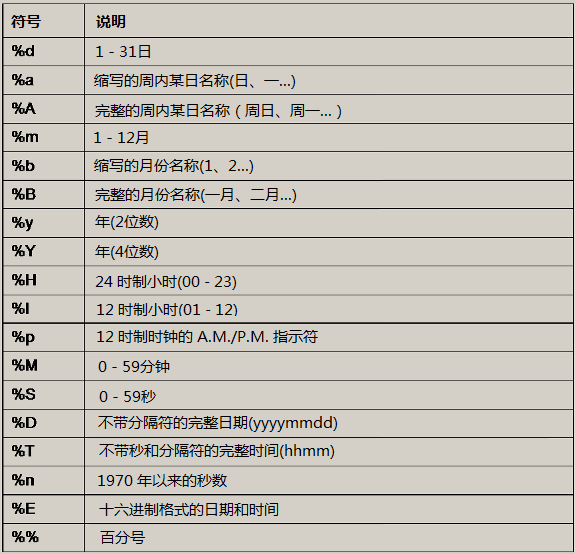
		<InputFormatField Name="date" Type="time"
               TimeFormat="%d/%m/%Y %H:%M:%S"/>
		<InputFormatField Name="server" Type="string"
               Source="compound">
		<Compound>
			<Segment SourceField="content"
                     RegularExpression=".*Job server: ([^\n]+).*" />
		</Compound>
		</InputFormatField>
	</InputFormatFields>
<TranslatorSwitch DefaultTranslator="GeoTranslator">
	<TranslatorCase  TranslatorName="NonGeoTranslator" Break="yes">
		<Condition SourceField="routing_info" Operator="EQ"
             Value="cnano"/>
	</TranslatorCase>
</TranslatorSwitch>
</InputFormat>
</InputFormatCollection>
	<InputFormatField Name="timestamp" Type="time"
	TimeFormat="%d/%m/%Y %H:%M:%S"/>
注意:在使用 InputFormatSwitch 时,InputFormat 节点的顺序非常重要 - 被引用的 InputFormat 应在前面已定义。
DefaultInputFormat - 指定与条件不匹配的情况下要路由到的 InputFormat 的名称
SourceField - 要测试的字段。
Operator - 测试类型,有以下选项:
ValueType -(可选)[constant/field/previousValue]
Value - 要匹配的值,或正则表达式。
MatchCase -(可选)[yes/no] 定义测试是否区分大小写。 如果设为“yes”,在测试之前将这两个值转换为小写。
Break [yes|no]
yes - (默认值)如果与条件匹配,不检查下一个条件。
no - 在任何情况下,评估条件并在匹配时操作转换器后,继续执行下一个条件。
LogicOperator -(可选)[and/or]。
TranslatorName - 满足条件时要重定向到的转换器。
Condition - 要在已处理数据上测试以确定要使用的相关转换器的条件。 它与 InputFormatSwitch 中的条件相同。
| 版权所有 © 2012 CA。 保留所有权利。 | 就该主题发送电子邮件至 CA Technologies |