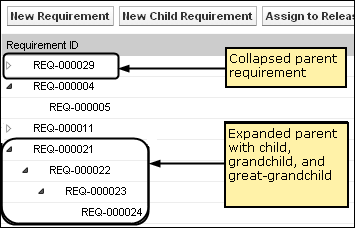
The requirements hierarchy lets you quickly identify which requirements have been associated as parent and child. The list shows in order by parent with the children below the parent.
To view the Requirements Hierarchy
You can edit some fields on the requirements hierarchy list page. To edit, click in a field. If the field can be edited, it activates so that you can make changes.
Right click on a requirement to see a menu that allows you to view, edit, delete, expand or collapse the requirement.
A gray arrow indicates a collapsed hierarchy with the children hidden. A black arrow indicates an expanded parent with the children listed below. In the following illustration, the expanded hierarchy has four levels. You can create an unlimited number of levels in a hierarchy.
| Copyright © 2011 CA. All rights reserved. | Email CA Technologies about this topic |