Enterprise Administration Guide › Integrating with CA User Activity Reporting Module › CA User Activity Reporting Module Integration Architecture › How Audit Data Flows from CA Access Control for Virtual Environments to CA User Activity Reporting Module
How Audit Data Flows from CA Access Control for Virtual Environments to CA User Activity Reporting Module
To understand how CA Access Control for Virtual Environments integrates with CA User Activity Reporting Module, and what to consider when configuring this integration, first consider the flow of audit data between CA Access Control for Virtual Environments and CA User Activity Reporting Module. The following illustration describes how CA Access Control for Virtual Environments routes audit events to a messaging queue on a Distribution Server, where the CA Access Control connector of CA User Activity Reporting Module pulls, maps, transforms, and then sends the events to the CA User Activity Reporting Module server:
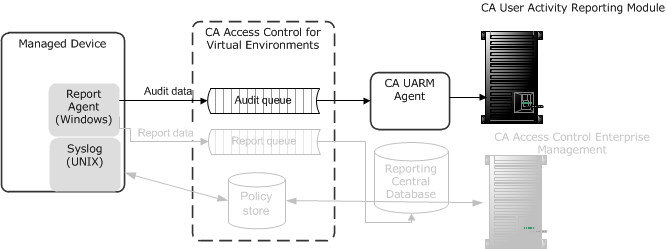
- The Report Agent collects audit events from the local audit files, applies any filtering policies, and places the events on a audit queue located on the Distribution Server.
- A CA User Activity Reporting Module connector connects with the audit queue and pulls events (messages) from it.
- CA User Activity Reporting Module maps the events to the Common Event Grammar (CEG) using data mapping and parsing files, and then applies suppression and summarization rules before routing the events to the CA User Activity Reporting Module server.
- The CA User Activity Reporting Module server receives the events and may apply additional suppression and summarization rules before the events are stored.
Note: For more information about how CA User Activity Reporting Module works, see the CA User Activity Reporting Module documentation.

