

|
|
|
An enterprise installation of CA Access Control lets you centrally manage policies, privileged accounts, and CA Access Control endpoints; view information about the policies on each endpoint; and report on the security status of endpoints. You can manage these features through web-based interfaces or through utilities.
To manage your enterprise installation of CA Access Control, install the Enterprise Management Server on a central computer and configure it for your enterprise.
CA Access Control is installed silently when you install the Enterprise Management Server. CA Access Control protects the Enterprise Management Server and provides core functionality that supports the applications in the Enterprise Management Server.
Once you installed the Enterprise Management Server, you install and configure the CA Access Control and UNAB endpoints. If you have existing CA Access Control endpoints, configure each endpoint for advanced policy management and reporting.
The following diagram shows the Enterprise Management Server architecture:
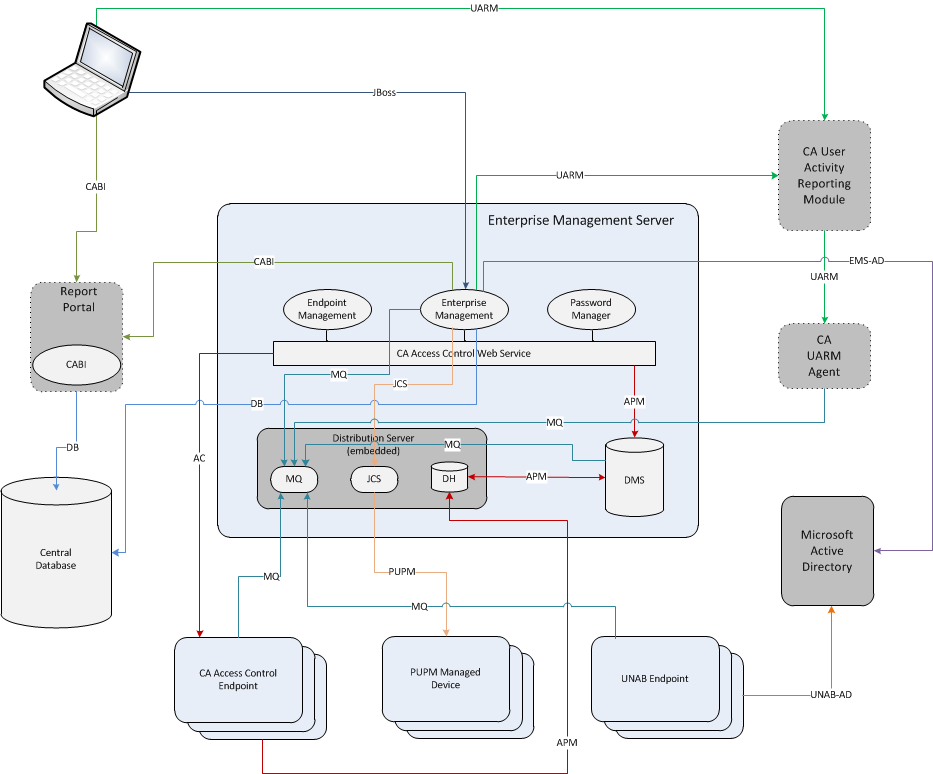
The previous diagram illustrates the following:
| Copyright © 2012 CA. All rights reserved. | Tell Technical Publications how we can improve this information |