Installing the Agent for Oracle › Configure the Agent for Oracle › Enable Submit Job from RMAN Console
Enable Submit Job from RMAN Console
The CA ARCserve Backup Agent for Oracle provides File-Based Mode backup and restore and RMAN Mode backup and restore. The RMAN Mode provides basic functionalities for RMAN. If you want to use advanced RMAN features, you can submit jobs using the RMAN Console.
To enable submit job from the RMAN console
- Start the Oracle Agent Configuration tool.
- Check the Allow jobs to be submitted directly from the RMAN Console option.
The Agent Host Information and the Server Information fields open.
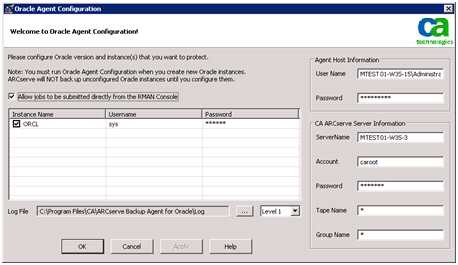
- Enter details for the following parameters:
- Agent Host Information:
- User name--Enter the user name.
- Password--Enter the password.
- CA ARCserve Server Information:
- Server Name--Enter the ARCserve server details to ensure the backups and restores are submitted on the server.
- Account--Enter caroot account details.
- Password--Enter the caroot password.
- Tape Name--Enter the tape name that you want to use for backup. If you want to use any tape then enter *.
- Group Name--Enter the group name that you want to use for backup. If you want to use any group then enter *.
- Click OK.
You can now submit RMAN scripts from the RMAN Console to be processed by the CA ARCserve server.

