

|
|
|
The following example displays individual sessions and the series of steps involved in using CA ARCserve Backup to perform a VSS backup.
To restore a transportable VSS backup of the Microsoft Hyper-V Writer
Microsoft Hyper-V backups are listed as separate sessions. Click the green icon next to the session's name to restore all of the Components included in the session. To restore an individual Component, expand the session and select the Component's name.
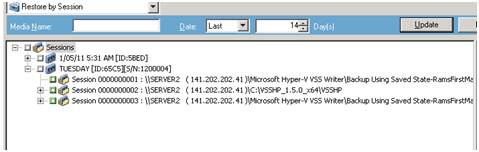
By default, files are restored to their original location. If you choose to restore files to an alternate location, a list of computers, directories, and files appears, from which you can select a specific destination. For more information about restore locations, see Restore Locations.
Important! Ensure that all storage groups are offline before the restore job starts.
Note: CA ARCserve Backup supports the backup of VM that are created in a CSV (Cluster Shared Volume) using transportable snapshot on Windows Server 2008 r2.
| Copyright © 2011 CA. All rights reserved. | Tell Technical Publications how we can improve this information |