

|
|
|
The following sections describe the options that the CA ARCserve Backup Agent for Microsoft SharePoint Server offers when performing database-level backups.
To configure the database-level backup options, right-click on a Farm object and click Agent Option. The Backup Options for Agent for Microsoft SharePoint 2010 dialog opens.
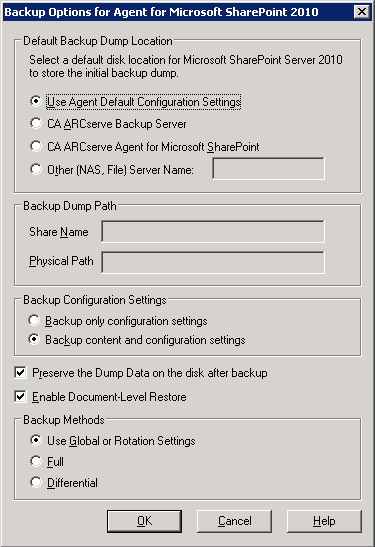
The Backup Options for Agent for Microsoft SharePoint 2010 dialog contains the following options:
The backup dump location tells CA ARCserve Backup where you want your data to be stored temporarily before saving it to a tape.
You can select from the following backup dump locations:
Note: You must specify the host name instead of an IP address.
You need to specify the share name and physical path.
Note: The share name should not contain the special character ‘$’ at the end.
You need to select a configuration setting.
This option is enabled by default. You can preserve the data on the disk after performing the backup operation.
Be aware of the following behavior:
You can perform the document-level restore operation. This option is enabled by default.
When you submit a backup job, you must select a backup method. The backup method tells CA ARCserve Backup how you want your data to be backed up. You can select from the following backup methods:
Note: Always perform a full backup when running the agent for the first time, after upgrading to a Service Pack, and after performing a restore.
Note: The Backup Method options on the Schedule tab do not apply, if you select the Full or Differential backup methods. Microsoft SharePoint 2010 does not support the Incremental Backup method. If you select Incremental Backup on the Schedule tab, it will still consider it as Differential Backup.
| Copyright © 2012 CA. All rights reserved. | Tell Technical Publications how we can improve this information |