Introducing CA ARCserve Backup Agents and Options › Using Options › Enterprise Option for SAP R/3 for Oracle › Introducing the Option › Option Integration with the Oracle Recovery Manager › How Recovery Manager Restores Data
How Recovery Manager Restores Data
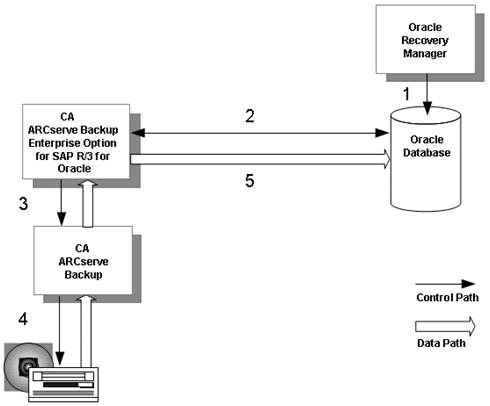
Initiate restore jobs from Oracle Recovery Manager using the following steps.
Note: When you restore with Recovery Manager, you can only restore with data that was backed up with Recovery Manager.
- The user issues a restore request to the Oracle database from the Recovery Manager command line interface.
- The database notifies the option of the restore request.
- The option notifies CA ARCserve Backup of the restore request.
- CA ARCserve Backup retrieves the data from a storage medium.
- The option restores the Oracle database.
Note: For information about how the Option works with the Agent for Oracle in RMAN mode, see Agent for Oracle guide.