

|
|
|
How You Can Identify Dynamically Shared Devices
You can use any of the following methods to identify dynamically shared devices.
The directory tree of the Device Manager window identifies dynamically shared devices with the icon shown in the following example. This example represents one dynamically shared changer with six drives.
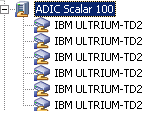
If a device is dynamically shared, you can view summary and detail information about the shared device in the Properties pane in the Device Manager window.
| Copyright © 2012 CA. All rights reserved. | Tell Technical Publications how we can improve this information |