

|
|
|
When you create a restore job, you can specify restore options to customize the job.
To configure the database-level restore options, right-click on a Farm object and click Agent Option. The Restore Options for Agent for Microsoft SharePoint 2010 dialog opens.
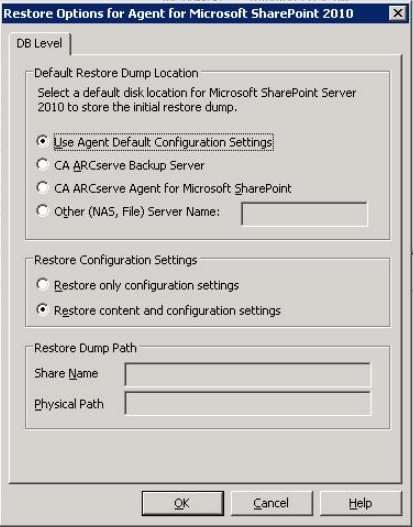
The Restore Options for Agent for Microsoft SharePoint 2010 dialog has:
Before you restore data, you must select a restore dump location. The restore location tells CA ARCserve Backup where you want your data to be stored temporarily before restoring it to the SharePoint server.
Note: If you configure the restore location using the restore option, the location configured using Agent Configuration option does not apply. You can select the following restore dump locations:
Note: You must specify the host name instead of an IP address.
Note: The share name should not contain the special character ‘$’ at the end.
For more information on these options and how you can configure them, see Configure the Agent on SharePoint Systems.
| Copyright © 2012 CA. All rights reserved. | Tell Technical Publications how we can improve this information |