Introducing CA ARCserve Backup Agents and Options › Using Agents › Client Agent › Adding and Configuring the Client Agents › Windows Client Agent Configuration › Configure Windows Network Communication
Configure Windows Network Communication
CA ARCserve Backup client agent services are shared across all configured client agents. By default, Windows client agents use TCP/UDP port 6050. You can change this behavior by using the Network Configuration menu in the Backup Agent Admin.
To configure Windows network communication
- Open the Backup Agent Admin.
- From the Options menu, select Network Configuration.
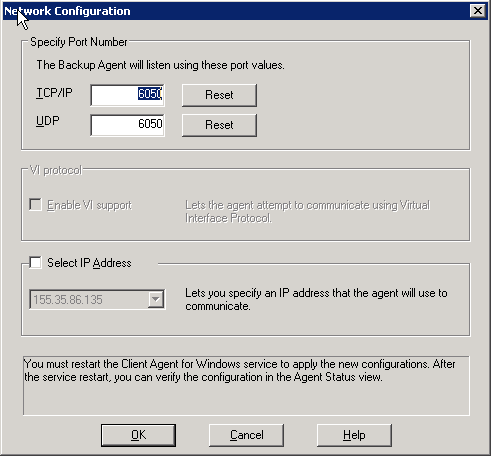
- Using this dialog, set the following network parameters for the client agent:
- Specify Port Number--Accept the defaults or enter the port values you want CA ARCserve Backup to use. If you want to use the original default port, click the Reset button. The updated port information will be saved in the local PortsConfig.cfg file located in \Program Files\CA\SharedComponents\ARCserve Backup.
Note: Updated port information must be registered with the CA ARCserve Backup server component. To do this, you must modify the remote server PortsConfig.cfg file. For more information on port configuration, see the Implementation Guide.
- Select IP Address--The Windows client agent supports the use of multiple network interface cards (NICs). For computers with more than one network card, the agent checks all enabled NICs in the machine. You can manually override this selection by choosing the IP address of the NIC that you want to dedicate for backup purposes. When you define this configuration, the client agent will listen using only this interface card. All other NICs are ignored and you will not be able to use their IP addresses to connect to the client agent.
Any updated information also needs to be modified in the Windows CAPortConfig.cfg file and copied to the CA ARCserve Backup home directory.
Example:
#Hostname IP address (optional) TCP port  UDP port
#myhost   nnn.nnn.nnn.nnn       6050      6050
mymachine nnn.nnn.nnn.nn        7090      7085

