Introducing CA ARCserve Backup Agents and Options › Using Options › Disaster Recovery Option › Recovering Clusters › Cluster Failure Scenarios › Scenario 2: Shared Disk Failure › Recover Cluster Quorum Disks with No Node Failures
Recover Cluster Quorum Disks with No Node Failures
To recover cluster quorum disks with no node failures
- Stop the cluster services on the secondary node.
- Shut down the secondary node.
- On the primary node, from the Windows Service Control Manager, set the cluster service startup type to Manual.
- From the Device Manager View menu, select Show Hidden Devices and disable the Cluster Disk Driver setting.
- If the cluster quorum disks are physically damaged, perform the following steps:
- Shut down the primary node.
- Replace the cluster quorum shared disk with new disks.
- Start the primary node.
Note: Have the Cluster Disaster Recovery Requirements readily available for reference.
- To restore the original disk signature for the shared disk, run one of the following utilities:
- dumpcfg.exe for Windows 2003 (See the output file created by this utility during the backup.)
- DiskPart for Windows 2008 or Windows 2008 R2
- Recreate and reformat the partitions on the non-quorum shared disk.
- From the Device Manager View menu, select Show Hidden Devices and enable the Cluster Disk Driver setting.
- Restore the system state backup. In CA ARCserve Backup, select System State session and right-click to select the local option.
The System State Restore Options dialog opens.
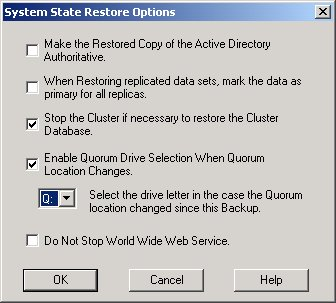
Note: If the cluster nodes are Active Directory Servers, you must reboot the primary node into directory restore mode when restoring the system state session.
- Restart the primary node.
- If the cluster files are not restored to the quorum disk, run the caclurst.exe utility to load the cluster database from the following:
%windir%\clusbkup
caclurst.exe is available in the ARCserve Home directory.
caclurst /s c:\%SystemRoot%\clusbkup /q Q:
If this is a remote disaster recovery, copy the caclurst.exe file to the Client Agent for Windows directory.
- Reboot the primary node.
- Connect the shared disks to the secondary node.
- Start the secondary node.

