

|
|
|
Valid on Windows platforms.
Symptom:
How can I reliably back up MSCS Nodes with CA ARCserve Backup installed on remote machines?
For information about recovering clusters, see the CA ARCserve Backup Disaster Recovery Option Guide.
Solution:
The CA ARCserve Backup Windows File System Agent must be installed on each node of the cluster.
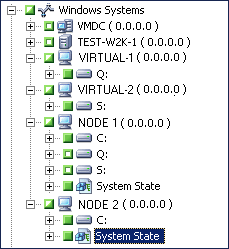
The challenge is to back up the shared disk reliably even if cluster shared disks fail over from one node to another. This can be done as follows:
Note: Because shared disks can move from one node to another and there is no reliable way of predicting which node will own the shared disks during backup, do not back up shared disks using the machine hostname.
Note: To provide disaster protection for your cluster nodes, you must perform a full backup of each node.
| Copyright © 2011 CA. All rights reserved. | Tell Technical Publications how we can improve this information |