Introducing the Agent › How the Agent Protects VMware Systems Using VCB › How CA ARCserve Backup Leverages VCB to Protect Your VMware Environment
How CA ARCserve Backup Leverages VCB to Protect Your VMware Environment
The agent lets you perform raw VM (full VM), file level VM backups, and mixed-mode VM backups using a backup proxy system.
The following diagram illustrates the network architecture for backing up VMware images or files using a backup proxy system:
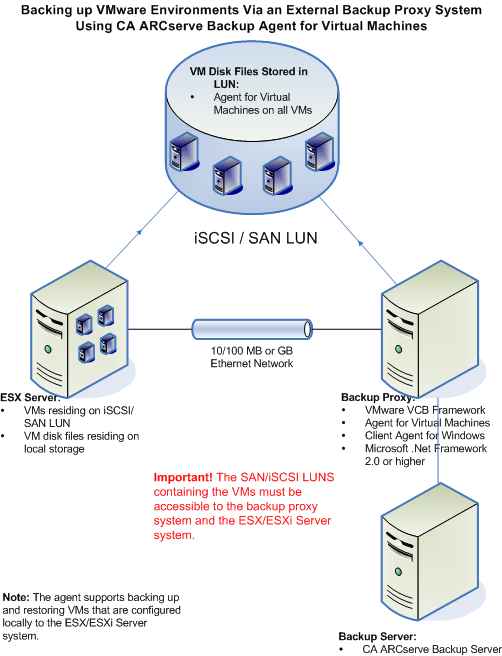
- The CA ARCserve Backup primary or member server communicates with the Agent for Virtual Machines that is running on the backup proxy system while the backup job is running. The agent then takes a snapshot of the VM and mounts or exports the snapshot to the backup proxy system, by default, into the Client Agent for Windows installation directory.
- If the backup mode specifies Allow File Level Restore, CA ARCserve Backup creates catalog files representing the volumes on the VM.
- CA ARCserve Backup then backs up the VM and the catalogs to the target backup media.
Note: For information about changing the default mount path, see Specify a Temporary VM Mount Location.
When you deploy this architecture in your environment, consider the following:
- The agent must be licensed on the CA ARCserve Backup primary or stand-alone server.
- The agent must be installed on all VMs where you want to perform file level restores to the guest operating system.
Note: For more information, see Where to Install the Agent.
- Microsoft .NET Framework Version 2.0 or higher must be running on the backup proxy system.
- If the VM resides on a SAN LUN, the LUN must be shared between the VMware ESX Host and the backup proxy system and have the same LUN number assigned.
Note: The above limitation only applies to VCB versions 1.0, 1.0.1, and 1.0.2. VCB versions 1.0.3 and later do not require a consistent LUN number.
The LUN in the backup proxy system should not be signed.
Note: To obtain the latest information about this configuration, see the VMware VCB documentation.
- The raw (full VM) level backup method makes a copy of the entire disk and the configuration files associated with a specific VM, letting you restore the entire VM.
The raw level backup can be used to recover VMs in the event a disaster occurs or there is total loss of the original VM.
- The file level backup method lets you make a copy of individual files contained on the disk in a VM, which can include all files.
You can use this method for situations that involve restoring files that were corrupted or accidentally deleted.
- The mixed mode backup method lets you perform GFS and rotation backup jobs that consist of weekly full backups in full VM (raw) mode and daily incremental and differential backups in file mode in a single backup job.
You can use this method to back up data at raw (full VM) efficiency and restore data at file level granularity.
- When you submit a backup job, you can perform a raw (full VM) level or file level backup of the VM. You must specify the primary or member server where the job will execute.
Important! To perform file level backups of a VM, a VMware-supported Windows operating system must be installed on the VM.