Populating the CA ARCserve Backup Database › Specify the Name of the CA ARCserve Backup Server
Specify the Name of the CA ARCserve Backup Server
To perform granular file level restores from raw (full VM) backups, you must specify the name of the CA ARCserve Backup server on your VMs.
This task is not required if you installed the CA ARCserve Backup Agent for Virtual Machines on your VMs using the Agent Deployment tool. For more information, see Deploy the Agent to VMs Using Virtual Machine Deployment.
Note: The steps that follow apply to VMware VMs and Hyper-V VMs.
To specify the name of the CA ARCserve Backup server
- Log in to the VM and open the Backup Agent Admin.
To open the Backup Agent Admin, click Start, Programs, CA, ARCserve Backup, and click Backup Agent Admin.
The Backup Agent Admin opens.
- From the drop-down list, select CA ARCserve Backup Client Agent and click Configuration on the toolbar.
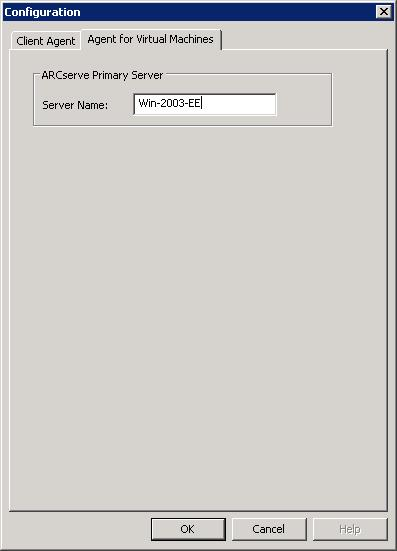
The Configuration dialog opens.
- Click the Agent for Virtual Machines tab.
In the Server Name field, specify the Host Name or IP address of the CA ARCserve Backup server that will protect this VM.
Click OK.
The name of the CA ARCserve Backup server is saved.
Note: Repeat these steps, as necessary, on all VMs in your CA ARCserve Backup environment.