Click the green box next to the drive directory, and then right-click the drive and select Local Options.
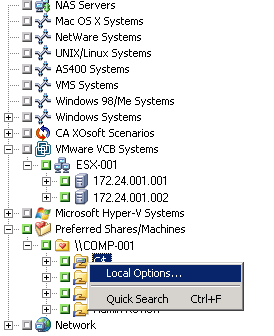
Important! When setting local options, you must select drives individually as your source even if you want to back up an entire server. You cannot click the green box next to the server name, and then customize local backup options for individual drives.
The Local Options dialog opens.
- Backup Verification Options
The Backup Verification options enable you to verify that your data was backed up correctly. The following options are available.
- None--If you select this, no verification will be performed on the data backed up.
- Scan Backup Media Contents--If you select this, CA ARCserve Backup scans the media and check that the header is readable for each file that is backed up.
- Compare Backup Media to Disk--Select this if you want CA ARCserve Backup to read blocks from the media and compare, byte for byte, the data on the media against the files.
- Session/Encryption Password Option
Use this option to specify a password to protect the data.
- Session/Encryption Password--Enter a password for your backup job.
Important! It is important that you remember the Session/Encryption password to restore this session. There is no way to reset this password.
- Compression and Encryption Options
Use these options to specify whether files should be compressed or encrypted before they are backed up. These options are not supported on deduplication devices. If you specify a deduplication device group as the backup destination or as the staging destination, compression and encryption are skipped if detected.
- Compress Files Before Backup Using Software Compression--Allows you to compress your files before running your backup job. Using this option directs CA ARCserve Backup to compress files before backing them up using a software compression algorithm. Since most tape devices are equipped with a hardware-based compression mechanism, using both software and hardware compression is unnecessary and can lead to a slow backup job and poor compression results. Therefore, you should select this option only if your tape drive is not equipped with a hardware compression mechanism.
- Encrypt Files Before Backup--Allows you to encrypt your files before running your backup job.
Important! CA ARCserve Backup performs local compression and encryption at the agent system. When you specify local compression and encryption and ARCserve server-based compression and encryption (global option), CA ARCserve Backup performs the compression and encryption at the agent system.
Note: For more information about specifying ARCserve server-based compression and encryption, see Backup Manager Backup Media Options.
- NetWare Volume Options
This option is available for NetWare servers only.
- Disable Snapshot--If the CA ARCserve Backup Agent for Open Files is installed on the server and you want to disable open file backup on an NSS volume, select this option.
Note: If you have database agents installed, you can also right-click them to customize local backup agent options. If you do this (similar to setting local options on drives, directories, and files), you must select database agents individually as your source even if you want to back up an entire server (You cannot click the green box next to the server name, and then customize local backup agent options).
The local settings are applied to the specified volume.