The Server Admin opens.
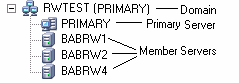
The CA ARCserve Backup primary server and its member servers display in a directory tree structure as illustrated by the following:
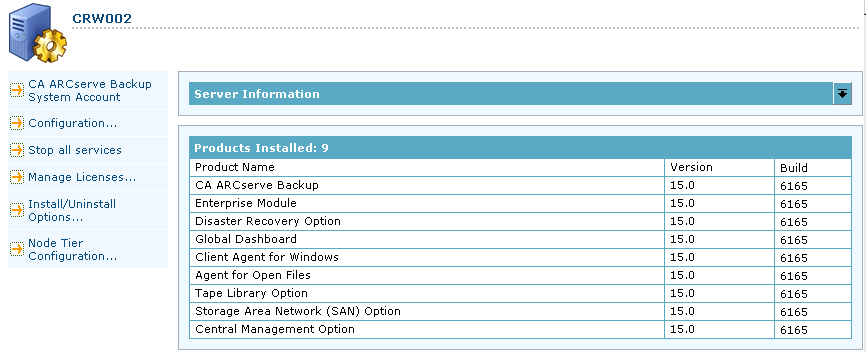
The components and licenses for the selected server display in the properties view, as illustrated by the following:
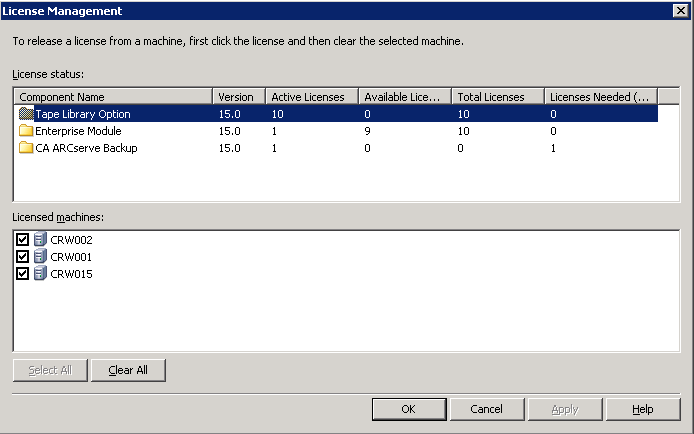
The License Management dialog opens.
The License Management dialog provides you with the following information:
- Version--Specifies the release number of the license for the selected component.
- Active Licenses--Specifies the number licenses that are currently active for the selected component. The total includes purchased licenses and trial licenses.
- Available Licenses--Specifies the number of licenses available for use for the selected component. The total includes only purchased licenses.
- Total Licenses--Specifies the total number of licenses purchased for the selected component.
- Licenses Needed--Specifies the number of additional licenses that you need to use the selected component.
Examples:
- You are using one purchased license and one trial license for a component. CA ARCserve Backup recommends purchasing one license to replace the trial license so that you have uninterrupted use of selected component.
- You are protecting six Windows computers using the Client Agent for Windows. You purchased four Client Agent for Windows licenses. In the past, backups may have failed due to an insufficient number licenses. CA ARCserve Backup recommends purchasing two additional licenses to help ensure that you have uninterrupted use of the Client Agent for Windows.
- Licensed machines--Specifies the names of the computers using the active licenses for the selected component.
Example:
- The following dialog illustrates that there are 10 active licenses and zero available licenses for the Tape Library Option. The host names of the computers using the Tape Library Option licenses display in the Licensed machines field.