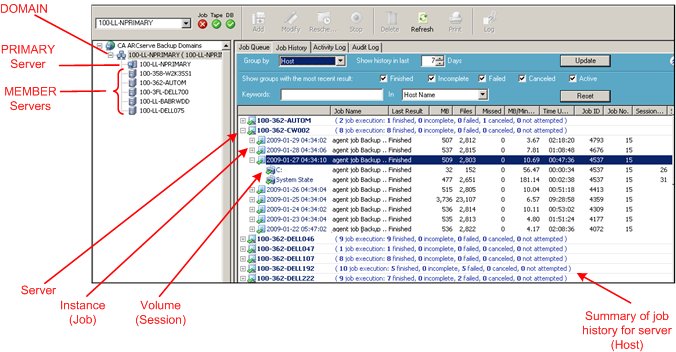
Job History is a feature that allows you to observe trends and isolate problems that occurred during a backup job. It provides a consolidated view that gives you easy access to statistical information about your backup jobs and information about the hosts that were backed up in these jobs. It offers the following two views:
In both the Host and Job views, the errors and warnings generated during each backup job are displayed on the Detail tab. These are displayed as active links to direct you to the online help for error messages. You can quickly identify why a job failed based on the error or warning provided. Also, in the Detail tab, you can view information about the specific devices and media used to back up the host for the selected job.
You can use the filter options to narrow down your results. For instance, you can filter the jobs so that only the failed jobs are displayed. You can specify part of a job name and view only those jobs which match that pattern.

For more information about the filter options, see the section Filter Job History.
| Copyright © 2010 CA. All rights reserved. | Email CA about this topic |