Note: If you are using Exchange Server 2003 and want information on performing Volume Shadow Copy Service backups, see the Microsoft Volume Shadow Copy Service Guide.
- Simple Exchange organization
- Standard Exchange organization
- Large Exchange organization
- Complex Exchange organization
Note: For more information about Exchange Server 2007 organization models, see the Microsoft TechNet web site.
Each Exchange mailbox server in the organization can have up to 50 storage groups. In a non-replicated environment, each storage group can have up to five database stores. In a replicated environment, each storage group can have one database. Each database can be mounted and dismounted independently.
- Recovery Storage Groups have been replaced with Recovery Database
- Database names must now be unique across your organization
- All copies are located at the same paths
- Active Manager is required to mount a database and determines which database is mounted
- All high availability configuration is performed post-setup
- Exchange Server 2010 server roles are supported by Windows Server 2008 with SP2 or later and Windows Server 2008 R2.
- Exchange Server 2010 and prior versions can be installed in the same organization.
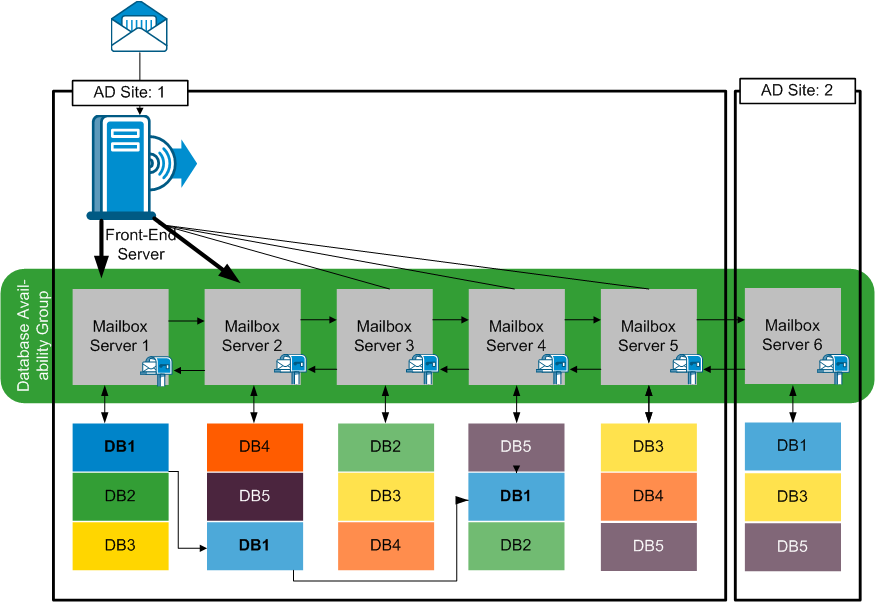
The concept of a Database Availability Group provides failover at database level, rather than server level, and is transparent to end users. In a DAG, only one copy of a database is active at any one time. CA ARCserve Backup lets you choose to back up from active databases or replicas. DAGs can include mailbox servers in separate physical locations, as well.