Introducing CA ARCserve Backup Agents and Options › Using Options › CA ARCserve Backup UNIX and Linux Data Mover › Best Practices › Best Practices for Protecting Oracle Data › How to Back Up Oracle Database Data to Data Mover Servers
How to Back Up Oracle Database Data to Data Mover Servers
You can back up Oracle database data to data mover servers only after doing the following:
- Install the Agent for Oracle on the UNIX or Linux nodes.
- Install UNIX and Linux Data Mover on the same UNIX or Linux nodes.
- Register the data mover server with the primary server in the CA ARCserve Backup domain.
To back up Oracle database data to data mover servers
- Log in to the data mover server.
Open a Command Line window and change to the Agent for Oracle home directory
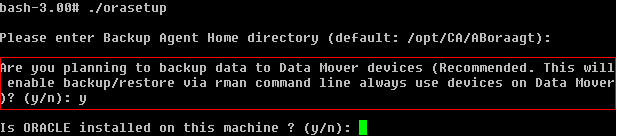
Execute orasetup to configure the oracle agent.
When prompted to back up data to a local data mover server, enter Y as illustrated by the following screen:
- From the Source tab on the Backup Manager window, expand the Oracle objects and select the objects that you want to back up.
- Click the Destination tab on the Backup Manager window.
A list of data mover nodes displays.
- Specify the device that you want to use for the backup.
- Specify the options and schedule that you require for the job.
Note: For more information, see Back Up Data to UNIX and Linux Data Mover Servers, the Administration Guide, or the online help.
- Submit the job.