Introducing CA ARCserve Backup Agents and Options › Using Options › CA ARCserve Backup UNIX and Linux Data Mover › Introducing CA ARCserve Backup UNIX and Linux Data Mover › UNIX and Linux Data Mover Limitations
UNIX and Linux Data Mover Limitations
UNIX and Linux Data Mover does not support backing up data to the following devices:
- CA ARCserve Backup tape RAID devices.
- CA ARCserve Backup data deduplication devices.
- Single-drive tape devices.
- Libraries that are connected directly to the data mover server.
Note: For more information about supported devices, see the CA ARCserve Backup Certified Device List on the CA Support website.
UNIX and Linux Data Mover does not support the following functionality:
- Backing up data using multiplexing.
- Backing up data using CA ARCserve Backup server-side encryption, CA ARCserve Backup server-side compression, and LTO encryption.
- Installing UNIX and Linux Data Mover using remote communication. You must log in to the data mover server and execute the installation script.
- Upgrading from a previous release of BrightStor ARCserve Backup for UNIX and BrightStor ARCserve Backup for Linux.
Note: CA ARCserve Backup lets you migrate database information from BrightStor ARCserve Backup r11.5 to this release. For more information, see Migrate Database Information from Previous Releases to the CA ARCserve Backup Database.
- Running the Tapecopy utility on the data mover server.
- Submitting jobs using CA ARCserve Backup command line utilities from the data mover server. For example, ca_backup and ca_restore.
- Backing up and restoring data to remote systems.
The following scenario describes how you can restore data to remote systems:
- The CA ARCserve Backup primary server, data mover server A, and data mover server B share a device that resides on the SAN.
- You back up data, which consists of sessions that reside on data mover server A, to the shared device that resides on the SAN.
- You restore the sessions from the device that resides on the SAN to data mover server B.
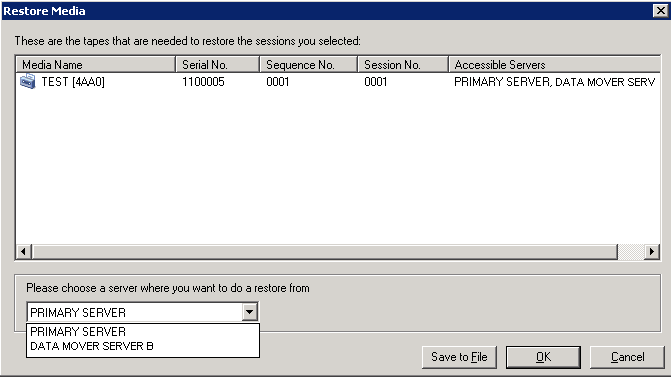
In this scenario, you can restore the data that was backed up to the shared devices on the SAN directly from the primary server or data mover server B, as illustrated by the following dialog: