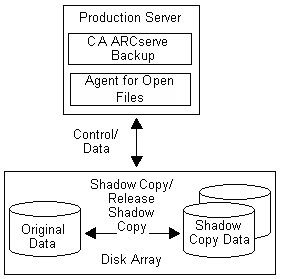
The Client for VSS Software Snap-Shot works with VSS to back up Writers, Components and file systems. It uses the system Provider included with Windows Server 2003 that uses a copy-on-write scheme to create the shadow copies. If a hardware provider is installed, the client uses it to create a full shadow copy of the entire volume.
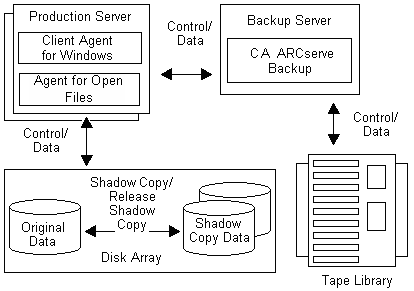
Using the Backup Manager and the Restore Manager in CA ARCserve Backup, you can select Writers on local or remote computers. The Client Agent for Windows must also be installed if you plan to perform backups and restores on remote computers.
The Client for VSS Software Snap-Shot can be used to back up Writers and Components on local or remote computers. In local VSS backups, the production server contains the original data to be backed up, and is also used as the location where the shadow copy data is created. In remote VSS backups, the Client Agent for Windows reads the data from the shadow copy instead of from the original volume.
The following illustration displays local configuration of the supported Client for VSS Software Snap-Shot:
The following illustration displays remote configuration of the supported Client for VSS Software Snap-Shot:
| Copyright © 2010 CA. All rights reserved. | Email CA about this topic |