Backing Up Microsoft SQL Server Databases › Backup Overview › Backup Manager Agent Options
Backup Manager Agent Options
You may select backup options on a per-database basis or define a set of default options for all databases in a backup job. The Agent then applies the options to each database as appropriate.
- Agent Options/Database Level Options--These are agent backup options and apply to only the selected database. They can either extend or override the Global Agent options. Access Database Level Options by right-clicking the database object and selecting Agent Option from the shortcut menu.
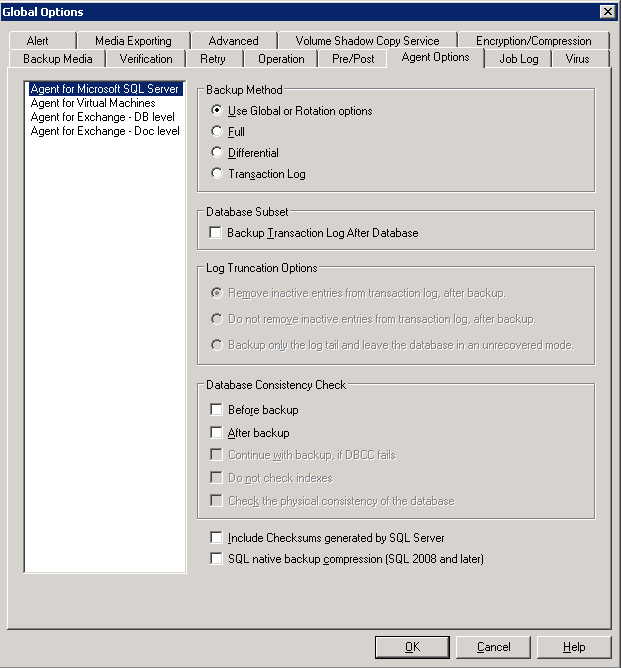
- Global Options/Agent Options--These options let you specify default job options for all selected objects in the Agent type. Global Agent Options are not supported by releases of the Agent prior to r12.5. Access Global Agent Options from the Agent Options tab of the Global Options dialog.
Global Agent Options applied at a global level let you specify default job options for all databases for the Agent selected. Options selected for a specific object at the database level can either extend or override the options specified as a global option. As a general rule, options applied at the global level will extend or override options that you specify on the Job Schedule tab.
Certain options are available from only one Agent Option dialog; they are noted.
Note: The agent combines options that you specify at the database level for a specific database with the appropriate global agent options.
You can specify Global Agent Options for the CA ARCserve Backup components that follow:
- Agent for Microsoft SQL Server--Includes the Agent for CA ARCserve Backup Database, which is supported by CA ARCserve Backup Agent for Microsoft SQL Server, r12.5 and later.
- Agent for Virtual Machines--Supported by the CA ARCserve Backup Agent for Virtual Machines, r12.5 and later.
- Agent for Microsoft Exchange Server - Includes Microsoft Exchange Server Database Level and Document Level options.
Consider the behavior that follows when packaging jobs using the above-described agents:
- Global agent options are not supported by releases of the above-described agents prior to CA ARCserve Backup r12.5, nor are they applied if you use any other agent to back up Microsoft SQL or Exchange Server databases.
- When you upgrade an older agent to CA ARCserve Backup r12.5 or later, the agent applies both any pre-existing local options and all global options that apply and do not conflict with the database level (local) options.
- For jobs packaged using older agents, local options are carried over as local options.
Agent Options (Database Level)
The agent options you apply to only the selected database can either extend or override Global Option/Agent Options. These options include:
- Backup Method -- see the topic, Backup Method Options.
- Use Global or Rotation Options
- Full
- Differential
- Database Consistency Check -- see the topic, Database Consistency Check Options.
- Before Backup
- After Backup
- Continue with backup if DBCC fails
- Do not check indexes
- Check the physical consistency of the database
- Other options -- see the topic, Other Options.
Agent Options (Global Options)
Global Options/Agent Options (supported by releases of the Agent in r12.5 and later) allow you to set default job options for all SQL Server Agent objects and include essentially the same options accessible from the local options.