The CA ARCserve Backup Agent for ARCserve Database is a form of the CA ARCserve Backup Agent for Microsoft SQL Server. The agent is either installed automatically when you install CA ARCserve Backup, or manually using a special utility, either after the location of the CA ARCserve Backup database is changed, or on multiple nodes of a cluster.
This utility, named SQLAgentRmtInst.exe, is placed in the Packages sub-folder of the CA ARCserve Backup home directory, in a folder named ASDBSQLAgent, when you install CA ARCserve Backup. If you need to install the agent on a computer that is not a CA ARCserve Backup server, you must copy the ASDBSQLAgent folder to the system where you are installing the agent, and run the SQLAgentRmtInst.exe utility on that machine.
By itself, the Agent for ARCserve Database allows you to back up and restore the CA ARCserve Backup database, and the system databases and Disaster Recovery Elements from the Microsoft SQL Server instance that contains the CA ARCserve Backup database. When installed with the Agent for Microsoft SQL Server, it allows the Agent for Microsoft SQL Server to recognize the presence of a CA ARCserve Backup database, and to work with CA ARCserve Backup to provide the special recovery mechanisms that are available for the CA ARCserve Backup database.
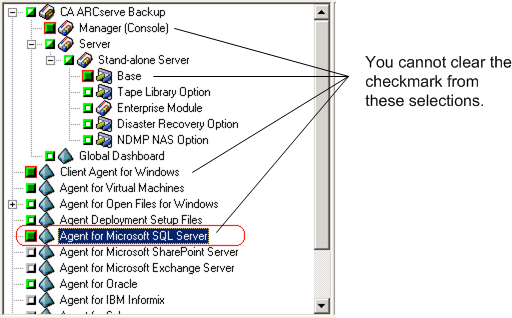
When upgrading from a previous release of CA ARCserve Backup, you must upgrade the Agent for ARCserve Database. This behavior is designed to help ensure that the current version of the CA ARCserve Backup database is protected by the current version of the agent. As a result, you cannot clear the check box next to Agent for Microsoft SQL Server in the product selection tree on the Components dialog as illustrated by the following:
Because the Agent for ARCserve Database is a form of the Agent for Microsoft SQL Server, it will appear as the CA ARCserve Backup Agent for Microsoft SQL Server in the system's installed programs list. If both are present, only a single entry will appear. If you need to uninstall one or the other, the installation sequence will prompt you to select which variant to remove.
You can use the stand-alone utility that installs the Agent for ARCserve Database in any of the following situations:
| Copyright © 2010 CA. All rights reserved. | Email CA about this topic |