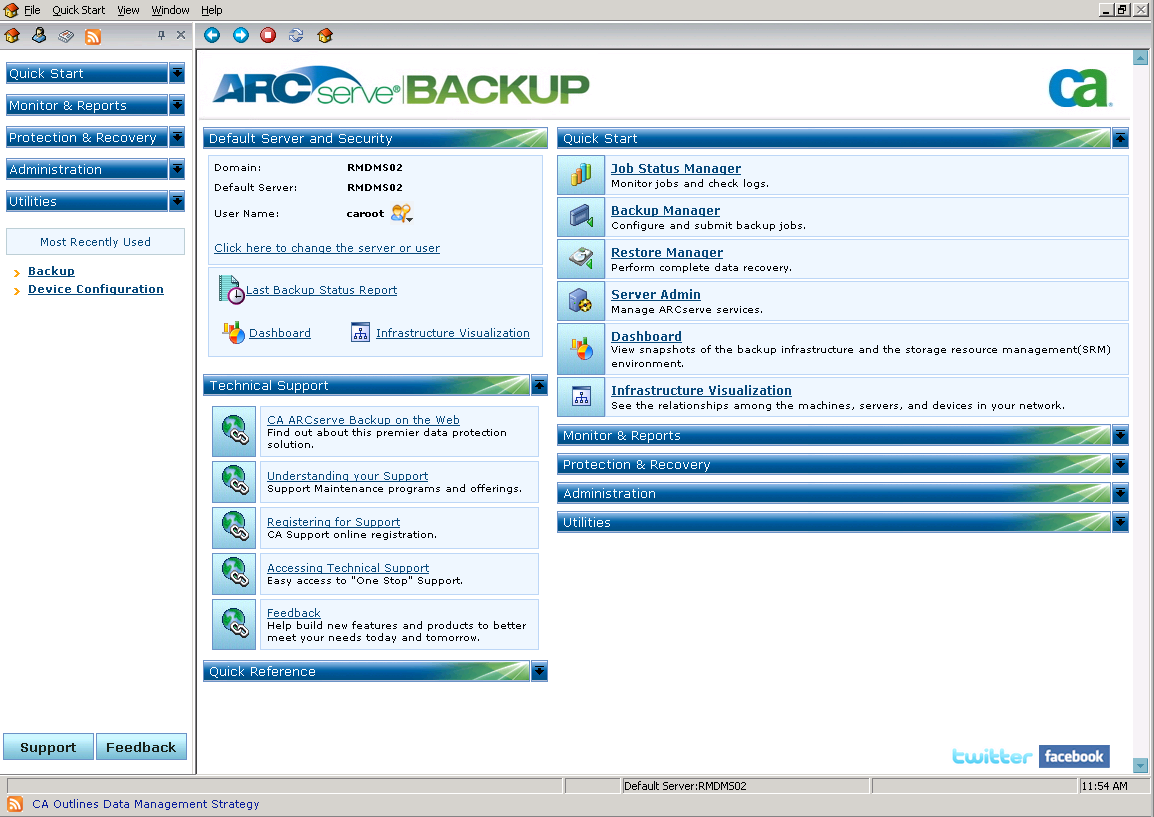
The Home Page is the central location from which you can log in to other CA ARCserve Backup servers and access all of the CA ARCserve Backup managers, wizards, and utilities.
- Default Server and Security
Displays the following information about the CA ARCserve Backup server:
- Quick Start
Lets you open the following CA ARCserve Backup Managers:
- Job Status Manager--Lets you monitor jobs and view logs.
- Backup Manager--Lets you configure and submit backup jobs.
- Restore Manager--Lets you perform complete data recovery.
- Server Admin--Lets you manage CA ARCserve Backup engines. For example, the Database Engine, the Job Engine, and the Tape Engine.
- Dashboard--Lets you access a snapshot overview of your backup infrastructure.
- Infrastructure Visualization--Lets you view the relationships between the computers, servers, and devices in your CA ARCserve Backup environment.
- Monitor and Reports
Lets you open the following managers and utilities:
- Job Status Manager--Lets you monitor jobs and view logs.
- Report Manager--Lets you perform complete data recovery.
- Report Writer--Lets you create custom CA ARCserve Backup reports.
- Dashboard--Lets you access a snapshot overview of your backup infrastructure.
- Protection and Recovery
Lets you open the following managers and wizards:
- Backup Manager--Lets you configure and submit backup jobs.
- Restore Manager--Lets you perform complete data recovery.
- CA ARCserve Replication--Lets you start or install CA ARCserve Replication. CA ARCserve Replication is a data protection solution that uses asynchronous real-time replication to provide disaster recovery capabilities. This link is active when you install CA ARCserve Replication. For information, see the CA ARCserve Replication Integration Guide.
- CA ARCserve D2D--Lets you start or install CA ARCserve D2D. CA ARCserve D2D is a backup solution that lets you track changes to data at the block level, and back up only the changed blocks. CA ARCserve D2D lets you perform frequent incremental backups, which reduces the size of the backups and provides you with up-to-date backup data.
- Administration
Lets you open the following managers, wizards, and utilities:
- Server Admin--Lets you manage CA ARCserve Backup engines. For example, the Database Engine, the Job engine, and the Tape engine.
- Central Agent Admin--Lets you manage CA ARCserve Backup agents.
- Device Manager--Lets you manage the storage devices in your environment.
- Device Configuration--Lets you configure your storage devices in your CA ARCserve Backup environment.
- Device Wizard--Lets you perform media operations.
- Device Group Configuration--Lets you configure the device groups in your CA ARCserve Backup environment and select the groups that you will use for the staging of data.
- Media Pool--Lets you create and maintain media pools in your CA ARCserve Backup environment.
- Database Manager--Lets you manage and maintain the CA ARCserve Backup database.
- Alert Manager--Lets you create alert notifications about events that occur during a backup.
- User Profile--Lets the CA ARCserve Backup administrator manage user profiles and provide access to CA ARCserve Backup.
- Agent Deployment--Launches the Agent Deployment tool, which lets you install and upgrade CA ARCserve Backup agents on remote hosts.
- Utilities
Lets you open the following wizards and utilities:
- Technical Support
The Technical Support section provides quick access to the following support tools:
- CA ARCserve Backup on the Web--Links you to the CA site that provides product information about CA ARCserve Backup.
- Understanding your Support--Provides maintenance and support information by product.
- Registering for Support--Provides an online form to register for CA Support Online.
- Accessing Technical Support--Offers the latest CA ARCserve Backup news and information from Technical Support, including white papers, how-to documents, videos, forums and user groups, troubleshooting guides, patches, and more.
- Feedback--Allows you to take a short survey, provide feedback for new product development, and sign up for your local user community group.
- Quick Reference
The Quick Reference section provides access to the following documentation:
- Readme--This document contains last minute updates and information that supplement the online help or the documentation.
- Release Summary--This document contains a summary of the new features added and enhancements made to CA ARCserve Backup.
- ARCserve News
The ARCserve News section provides access to a list of news articles and press releases.