The Server Admin opens.
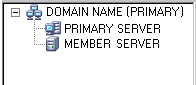
The domain directory tree is illustrated by the following:
The Install/Uninstall Options dialog opens.
From a primary and stand-alone CA ARCserve Backup server, you can use the Server Admin to install and uninstall the following CA ARCserve Backup options:
Before you install and uninstall CA ARCserve Backup server based options, the following considerations apply:
You must manually configure devices that CA ARCserve Backup does not automatically detect.
To install and uninstall CA ARCserve Backup server based options
The Server Admin opens.
The domain directory tree is illustrated by the following:
The Install/Uninstall Options dialog opens.
| Copyright © 2010 CA. All rights reserved. | Email CA about this topic |