Customizing Jobs › Job Customization Methods › Dynamic Job Packaging › Exclude the CA ARCserve Backup Database from Backup Jobs
Exclude the CA ARCserve Backup Database from Backup Jobs
CA ARCserve Backup backs up the CA ARCserve Backup database when you submit a full node backup of the primary server or stand-alone server. This is default behavior that is designed to help ensure that you protect the most current data in the CA ARCserve Backup database as you back up the primary server or stand-alone server. Optionally, you can exclude the CA ARCserve Backup database from the backup job using the following steps.
To exclude the CA ARCserve Backup database from backup jobs
- Open the Backup Manager.
- Click the Start tab and specify the backup type that you require for the job.
- Click the Source tab.
From the view drop-down list, select Group View.
The Backup Manager groups the agents installed in your CA ARCserve Backup environment.
- Expand the Microsoft SQL Server object.
Locate the primary server or stand-alone server.
Click the check box next to the primary server or stand-alone server.
The Backup Manager selects all of the content in the backup server.
- Do one of the following:
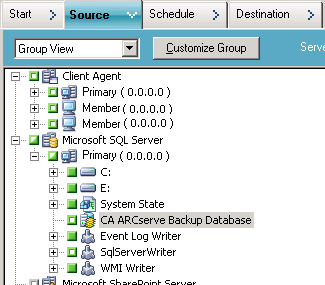
- Microsoft SQL Server Express Edition databases--Clear the check box next to CA ARCserve Backup Database.
- Microsoft SQL Server databases--Clear the check box next to ASDB.
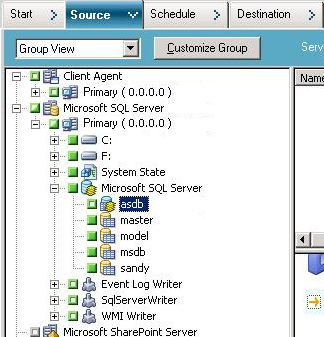
The CA ARCserve Backup database is excluded from source for the backup job.
- Click the Schedule tab and specify the schedule that you require for the job.
- Click the Destination tab and specify the destination that you require for the backup data.
- Click Options on the toolbar and specify additional options that you require for the job.
- Click Submit on the toolbar to submit the job.
CA ARCserve Backup backs up the entire backup server and does not back up the CA ARCserve Backup database.