

|
|
|
                                 ┌──────► YCHKFUNPAR ──────┐
YCHKFUNPAR ─────── MDLLIB ───────┤                         ├─────►
                                 └── model library name ───┘
The following parameter is for the YCHKFUNPAR command:
The name of the model to be analyzed. Values for this parameter are described in the following:
YCHKFUNPAR processing includes processing to provide feedback on the progress. If the job is running interactively, a message is sent that indicates the current object being processed and the percentage complete. For example:
Processing Object 837 of 2476. 33% Completed.
If the job is running interactively or in batch, a message is sent to the joblog to indicate the total number of objects to be processed, and a message is sent when every 10% block is reached. For example:
YCHKFUNPAR (MYMDL)
Total number of objects to process: 169
Processing Object 1 of 169. 0% Completed.
Processing Object 17 of 169. 10% Completed.
Processing Object 34 of 169. 20% Completed.
Processing Object 51 of 169. 30% Completed.
Processing Object 68 of 169. 40% Completed.
Invalid duplicate parameter field on Function 'CHANGE BOOKING' (@@1100454) on File 'BOOKING'. Processing Object 85 of 169. 50% Completed.
Invalid duplicate parameter field on Function 'CANCEL BOOKING' (@@1100541) on File 'BOOKING'.
Non-unique parameter SEQ on Function 'PREPARE LOGIN'   (@@1100562) on File 'SECURITY'.
Processing Object 102 of 169. 60% Completed.
Invalid duplicate parameter field on Function 'PROCESS BILL' (@@1100624) on File 'BILL'.
Invalid duplicate parameter field on Function 'PROCESS TICKET' (@@1100645) on File 'TICKET'.
Processing Object 119 of 169. 70% Completed.
Non-unique parameter SEQ on Function 'VALIDATE ORDER' (@@1100742) on File 'ORDER'.
Processing Object 136 of 169. 80% Completed.
Processing Object 153 of 169. 90% Completed.
Processing Object 169 of 169. 100% Completed.
Non-unique parameter SEQ on Function 'CHECK CUSTOMER'   (@@1100872) on File 'CUSTOMER'.
4 functions identified that contain an invalid duplicate parameter field.
3 functions identified that contain non-unique parameter SEQ & DUP PARMS=Y.
Model MYMDL examined to identify functions with invalid parameter interfaces. See job log for details.
Checks whether a source member or i OS object exists for each entry on a job list. Checks your authority to each i OS object found. You can also use the command to check your authority level to each i OS object found. If the object already exists, it is dropped from your job list.



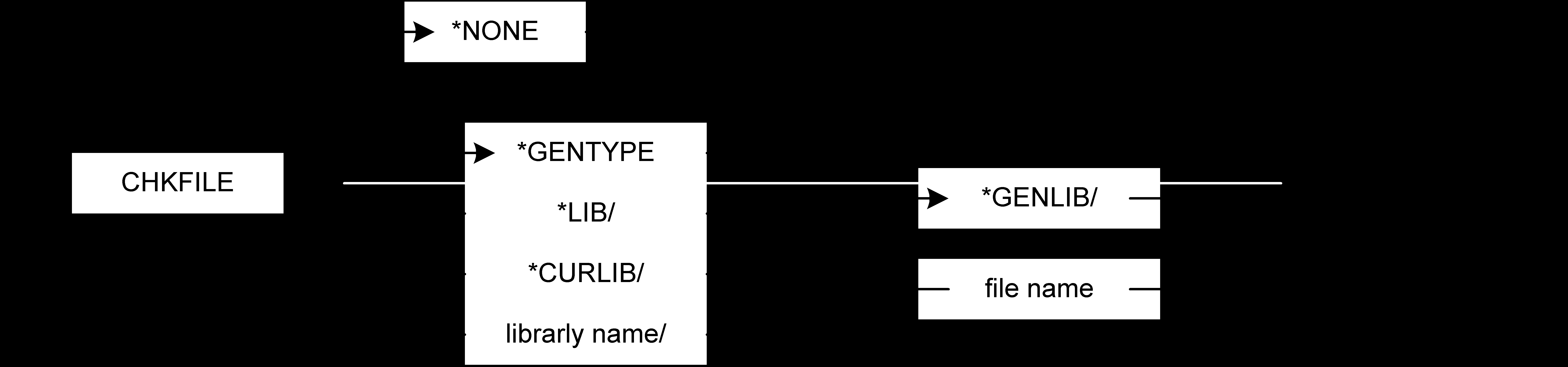
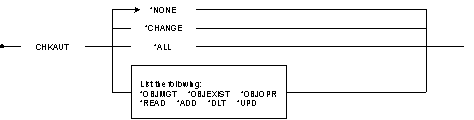

The following are parameters for the YCHKJOBLE command.
Qualified name of a job list where you place entries. Name of the job list whose entries are checked. Values for this parameter are described in the following:
List update option. Values for this parameter are described in the following:
Name of the library to use when checking for the existence of i OS objects corresponding to each job list entry. Values for this parameter are described in the following:
Name of shared folder to check for the existence of Synon/TC source objects corresponding to each job list entry. Values for this parameter are described in the following:
Qualified source file name to check for the existence of a source member corresponding to each job list entry. Values for this parameter are described in the following:
i OS authorities to check after checking for object or source member existence, as specified by the CHKLIB or CHKFILE. The value for this parameter is as follows:
For more information on i OS authority values, refer to the IBM CL Programmers guide.
The job list must already exist. Job lists are created using either the command Build Job List (YBLDJOBLST) or Convert Model List (YCVTMDLLST) from a command line, or by prompting the command from within a design model.
To check for the existence of i OS objects in the generation library corresponding to the entries on job list MYJOBLST, removing all the entries for which a corresponding i OS object is found:
YCHKJOBLE UPDOPT(*RMVOK) +
CHKLIB(*GENLIB) JOBLST(MYJOBLST)
This command checks your model for inactive internal records and unresolvable model object references. These can occur, for example, if a power outage results in an incomplete update or if a developer makes an error while using YWKRF to change model file data.
The ACTION parameter lets you specify whether the internal files or the objects in your model are to be checked. It also lets you specify whether the command will run in prepass or update mode. All errors found are reported, and in update mode, inactive internal records are backed up to files in a library you specify before being deleted from the model.
Note: If you need to restore data from a backup file, you should take great care to specify the correct member name. It will be the same as the name of your model library. When copying data back, be sure to specify *ADD for the MBROPT parameter on the Copy File (CPYF) command.



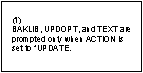

The following are parameters for the YCHKMDL command.
The name of the model to be analyzed. Values for this parameter are described in the following:
Specifies the type of check to perform and whether to run in prepass or update mode. A report is produced listing any data in error. Values for this parameter are described in the following:
The name of the library that is to receive backup data.
The data is written to a file that has a name similar to that of the originating file; the member name is the same as the name of your model library. For example, an inactive record in the YSCRENTRFP file (screen or report device entries) in model library MYMODEL, would be written to file YSCRENTXXP and member MYMODEL in the backup library. You can therefore specify a single backup library to store all deleted data from all the models on the system.
This parameter is prompted only in *UPDATE mode. Values for this parameter are described in the following:
This parameter specifies whether new data written to the backup members should replace or be added to existing data. This parameter is prompted only in *UPDATE mode. Values for this parameter are described in the following:
The text to be attached to any new members added to the backup files. This parameter is prompted only in *UPDATE mode. Values for this parameter are described in the following:
To examine internal files in model library GR5MDL and to produce a report without updating data:
YCHKMDL MDLLIB(GR5MDL) ACTION(*PREPASS)
YCHKMDL processing now includes some additional processing to provide feedback on the progress of YCHKMDL.
Processing Object 837 of 2476. 33% Completed.
Total number of objects to process: 2476
Processing Object 1 of 2476. 0% Completed.
Processing Object 248 of 2476. 10% Completed.
Processing Object 496 of 2476. 20% Completed.
Processing Object 743 of 2476. 30% Completed.
Processing Object 991 of 2476. 40% Completed.
Processing Object 1238 of 2476. 50% Completed.
Processing Object 1486 of 2476. 60% Completed.
Processing Object 1734 of 2476. 70% Completed.
Processing Object 1981 of 2476. 80% Completed.
Processing Object 2229 of 2476. 90% Completed.
Processing Object 2476 of 2476. 100% Completed.
This command allows a user to simultaneously check model object list entries and to remove certain, unwanted entries. The command also allows entry details to be refreshed from the originating object.
An outlist capability allows users to filter entries to an alternative list leaving the input list unchanged by the filtering process. In other words, if you specify an output list, the input list will not be updated.












The following are parameters for the YCHKMDLLST command.
The qualified name of the model object list that is checked. Values for this parameter are described in the following:
Check list entry method. Values for this parameter are described in the following:
List update option. Values for this parameter are described in the following:
This parameter allows model object list entries to be filtered by the model object list entry flag value. Values for this parameter are described in the following:
Check model library name. This parameter enables objects from one model to be checked against objects of the same name in another model. Values for this parameter are described in the following:
This parameter identifies whether the objects on the list are current. Values for this parameter are described in the following:
The checked out to list may be examined with this parameter. Values for this parameter are described in the following:
The check out status of list entries may be checked. Values for this parameter are described in the following:
This parameter allows the lock status of each object on the list to be examined. Values for this parameter are described in the following:
This parameter specifies the value used in combination with the UPDLST parameter. Selected list entries are updated with this value if UPDLST is specified as *FLAGERR or *FLAGOK. Values for this parameter are described in the following:
The name of the model object list which is the target for entries that satisfy any filter. Values for this parameter are described in the following:
This parameter specifies the action taken if the outlist specified in the OUTLST parameter already exists in the model. Values for this parameter are described in the following:
To refresh model object list OLDLST so that all the list entries are completely up to date:
YCHKMDLLST MDLLST( *MDLLIB/OLDLST ) + UPDLST( *RFSALL )
To check model object list FUNLST to determine that all objects on the list still exist in the model:
YCHKMDLLST MDLLST( *MDLLIB/FUNLST ) + UPDLST( *RMVERR )
Using the *RMVERR option for UPDLST will ensure that only valid objects remain on the list.
| Copyright © 2011 CA. All rights reserved. | Tell Technical Publications how we can improve this information |