

|
|
|
When a parameter is not passed as an array the behavior of the Edit Action Diagram panel remains the same as previous versions of CA 2E. However, where a parameter is being passed as an array, there is a new single subfile line that indicates an array being passed.
Note: If the called function’s parameter interface is modified to toggle the parameter Passed as Array field from Y to blank, the behavior of the EDIT ACTION – FUNCTION DETAILS changes accordingly to match.
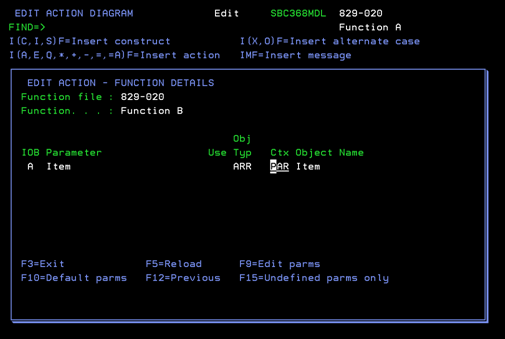
A, indicating an Array.
ARR, indicating array.
Only PAR or ARR is allowed.
Note: This is an input capable field. ARR is always valid as a choice when the called function’s parameter is passed as an array. However, if you select PAR, but the definition of the array on the calling function is incompatible with the definition of the array on the called function, a warning is sent (after PAR is selected) and the change to PAR cannot be saved/completed.
Item, indicating the name of the array.
Note: This field is output only.
The array’s subfields and their usages are NOT shown on this panel. But you could examine Function B’s parameter interface (and detailed usage) via F9=Edit Parms.
This screen shows what the function call will look like for passing an array called Item:
When a parameter is being passed as an array,the context defaults to ARR if F10=default parms is used. If the context is changed to PAR, the panel validates that the selected array is available in the PAR context and that all array subfields have compatible usages.
Note: MIAPs do not automatically get defaulted to PAR/PRn context, even when they are available. Your choices for populating MIAP parameters are:
| Copyright © 2011 CA. All rights reserved. | Tell Technical Publications how we can improve this information |