

|
|
|
The *Cursor Field always contains the name (DDS name, for example Z1ABCD) of the field where the cursor is currently positioned.
|
IS Comparison Operator |
You can use the IS comparison operator to determine whether the cursor is positioned on a specific field on the panel by comparing the PGM |
|
Cursor Field to the field. You can use the IS comparison operator in any condition statement. |
|
The following is an example of the IS comparison operator. This example shows A test that determines if the cursor is positioned on the Customer Status field.
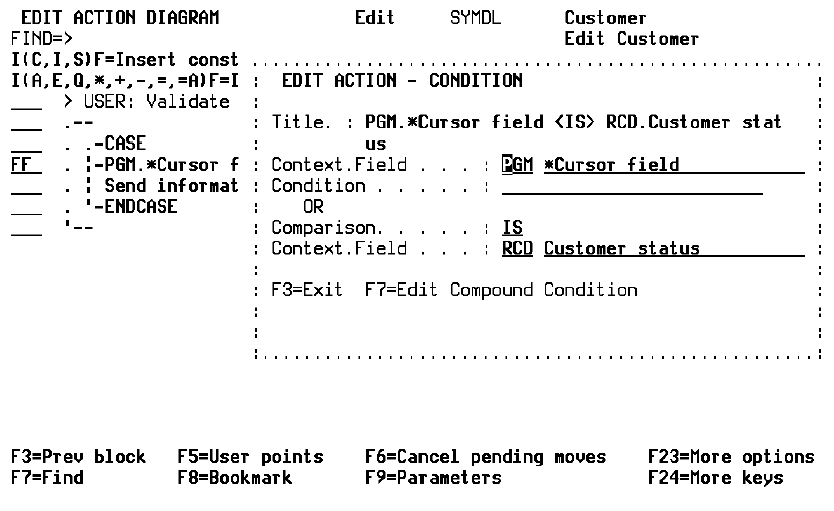
Use the PGM *Cursor Field to test for cursor position on subfile fields with the RCD context. In this case, both the field and the subfile record must match the cursor position for the test to be true. This is implemented automatically by CA 2E.
When testing for cursor position on subfile records, the logical place to insert the CASE statement in the action diagram would be
USER: Process subfile record (or equivalent user point.)
Some additional logic is required to test for a cursor position in the DSPFIL, EDTFIL, and SELRCD function types. This is discussed under the example for PGM *Re-read subfile record field.
PGM *Cursor Field is available for reference only. For example, you are not able to move conditions or values into this field.
| Copyright © 2011 CA. All rights reserved. | Tell Technical Publications how we can improve this information |