

|
|
|
This topic gives details about the selection parameters for the *DATE DETAILS, *DATE INCREMENT, and *DURATION built-in functions. It also discusses the related *Date list autoload parameter. The selection parameters are
Note: For the *DATE INCREMENT and *DURATION built-in functions, you can specify a value other than *NO or NONE for the selection parameters only if the *Duration type parameter is *DAYS.
*Excluded Days Of Week
This parameter is a condition field or derived field of type STS. Use this parameter to specify days that are normally to be excluded from an operation; for example, weekends or days not worked by part-time employees.
Each value you specify for this parameter consists of seven digits. Each digit can be 1 or 0 and corresponds to a day of the week beginning with Monday. A 1 indicates that the day is to be included in the operation; a 0 indicates that the day is to be excluded.
The possible values are shown in the following table.
|
*Excluded Days of Week Values |
Description and Examples |
|---|---|
|
*NO |
Include all days of the week. The value is 1111111. |
|
*SUNDAY |
Exclude Sundays. The value is 1111110. |
|
*SATURDAY |
Exclude Saturdays. The value is 1111101. |
|
*SATURDAY, SUNDAY |
Exclude Saturdays and Sundays. The value is 1111100. |
|
User-defined |
You define which days of the week to include and exclude; for example, if your department works Tuesday through Saturday, define a condition with value 0111110. |
You can modify the selection rule set by this parameter using the other two selection parameters.
This parameter specifies the name of an existing date list.
Date lists let you override the selection rules set by the *Excluded days of week parameter for particular dates; for example, holidays. A date list consists of a unique name, a list of dates, and a 1 or 0 for each date to indicate whether to include or exclude the date. To use a date list, specify its name on the *Date List name parameter.
Note: You can specify dates for different years on the same date list.
The default for *Date List name is NONE; in other words, no date list is specified. This value is required in the following cases.
When a date built-in function uses a date list executes, it expects to find the specified *Date List name in the *Date Lists array. This array and the function needed to create it are shipped with CA 2E. Each element of the array is comprised of the following fields:
|
Field Name |
Type |
|
|---|---|---|
|
*Date List Name *Date absolute day *Date flag |
VNM NBR STS |
Key Key Atr |
For more information on arrays, see Building Access Paths, in the chapter "Defining Arrays."
To load a date list into the *Date Lists array you can do one of the following:
To create date lists for use with the *Date list autoload capability, you can use the Work with Date List function that is shipped with CA 2E in the *Date List Header file. The information you enter is stored in the *Date List Header and *Date List Detail files.
The *Date List Header and *Date List Detail physical and logical files are supplied in the generation library in addition to being defined in the model. If you want to maintain these files, you need to regenerate and compile them.
Notes:
Suppose Company ABC is closed for business on certain holidays. The following example shows a date list, created using the Work with Date List function that excludes those holidays.
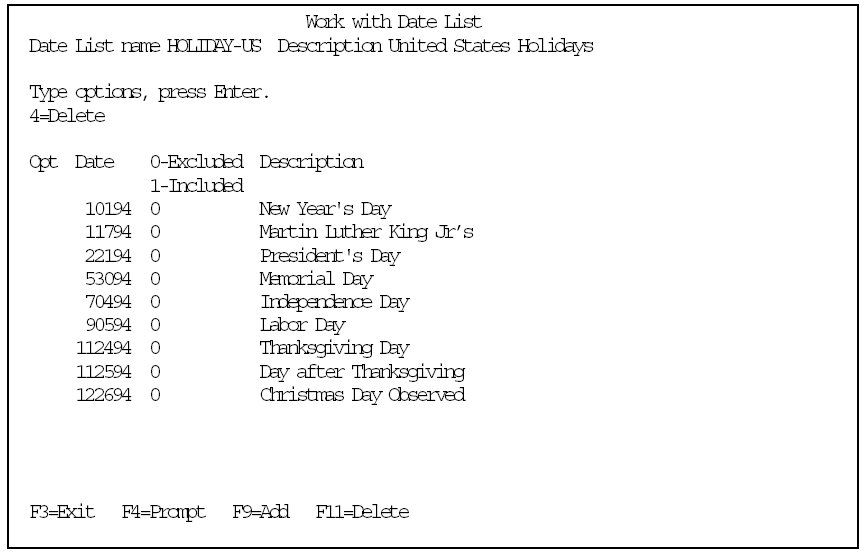
You can create a similar date list to include days that are not considered normal business days. For example, suppose the employees of Company ABC are required to work on a Saturday for the company inventory. The date list would contain an entry like the following.
70994 1 Company Inventory Day
You can reverse the effect of the selection rule set by a date list by specifying *EXCLUDE for the *Select days/dates parameter; in other words, you can select excluded days instead of included days.
*Select Days/Dates
This parameter lets you reverse the selection set by the *Excluded days of week and *Date List name parameters. Normally, only included days are selected and considered by a date built-in function. This parameter lets you select excluded days instead.
The possible values for this parameter are shown in the following table.
|
*Select Days/ Dates Values |
Effect on the Output of the Date Built-In Function |
|---|---|
|
*INCLUDED |
Select only days that are either Flagged as included on the *Date List. 2. Not excluded by *Excluded days of week and not flagged as excluded on the *Date List. This is the default. |
|
*EXCLUDED |
Select only days that are either Flagged as excluded on the *Date List. Excluded by *Excluded days of week and not flagged as included on the *Date List. This lets you reverse the default selection. |
|
*NO |
The default is automatically changed to *NO when the built-in function does not require selection; for example, when *Duration type is not *DAYS or when *Date details is *ABSOLUTE DAY. If the built-in function requires selection, you cannot specify *NO. |
| Copyright © 2011 CA. All rights reserved. | Tell Technical Publications how we can improve this information |