

|
|
|
The Display Transaction (DSPTRN) function defines a program that displays the records from two distinct but related database files. The files must connect by a file-to-file relation. The relation that connects the files must be an Owned by or a Refers to relation.
The DSPTRN function has two distinct record formats:
The DSPTRN function loads the entire subfile, and is suitable for using SUM, MIN, CNT, and MAX function fields.
A typical use of DSPTRN is to display an Order Header at the top of the panel with a subfile of the associated Order Details below.
The key fields in the header format are input-capable. All non-key fields in the header format are by default output only, .
All fields in the detail format are by default output capable.
If no key, or a partial key is supplied to the DSPTRN function, the key fields from header format appear, prompting you for the remainder of the key in order to identify the file.
The DSPTRN function must be attached to a Span (SPN) access path. The SPN access path connects two record formats with a common partial key. There is no default update processing for this function type.
In order to be able to create a Span access path:
The following is an example of a DSPTRN panel.
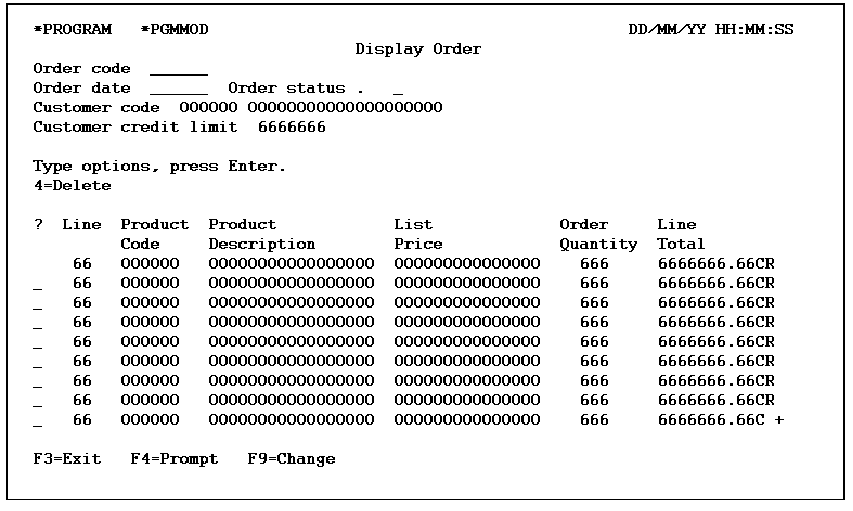
The panel has the default design for a single and multiple style panel.
The following table shows the parameters available.
|
Parameters |
Usage |
Role |
Default |
Option |
|---|---|---|---|---|
|
Return code |
B |
- |
Y |
R |
|
Part/fully restricted key hdr key |
I |
RST |
- |
O |
|
Other fields |
Any |
-/MAP |
- |
O |
The following table shows the function options available.
|
Options |
Default Value |
Other Values |
|---|---|---|
|
Subfile selection |
Y |
N |
|
Subfile end |
M(YSFLEND) |
P, T |
|
Send all error messages |
M(YSNDMSG) |
Y, N |
|
Confirm prompt |
N |
Y |
|
Confirm initial value |
M(YCNFVAL) |
Y, N |
|
Post-confirm pass |
N |
Y |
|
If action bar, what type? |
M(YABRNPT) |
A, D |
|
Commit control |
N(*NONE) |
M(*MASTER), S(*SLAVE) |
|
Generate error routine |
M(YERRRTN) |
Y, N |
|
Reclaim resources |
N |
Y |
|
Closedown program |
Y |
N |
|
Copy back messages |
M(YCPYMSG) |
Y, N |
|
Generation mode |
A |
D, S, M |
|
Screen text constants |
M(YPMTGEN) |
L, I |
|
Generate help |
M(YGENHLP) |
Y, N, O |
|
Help type for NPT |
M(YNPTHLP) |
T, U |
|
Workstation implementation |
M(YWSNGEN) |
N(NPT), G(GUI), J(JAVA), V(VB) |
|
Distributed file I/O Control |
M(YDSTFIO) |
S, U, N |
For more information on function options, see the chapter "Setting Default Options for Your Functions."
If no key, or a partial key is supplied to the DSPTRN function, the key fields from the header format (which are input-capable) display. These fields prompt for the remainder of the key so that the header record to display can be identified. If the parameter list contains all of the key fields as restrictors, this step is bypassed.
| Copyright © 2011 CA. All rights reserved. | Tell Technical Publications how we can improve this information |