

|
|
|
Restrictor Parameters are only for key fields. Specifying restricted key (RST) parameters to the DSPFIL function restrict the records that are written to the subfile for display. Only records from the based-on access path with key values that match exactly these values appear. Restrictor parameters are output only.
Positioner Parameters are only for key fields. The effect of positioner key fields is that only records from the based-on access path with key values greater than or equal to the specified positioner key values appear in the subfile. Any key field that is defined to the DSPFIL function as an Input/Mapped parameter acts as a positioner for the subfile display.
Selector Parameters are only for non-key fields. The effect of selector fields is that only records from the based-on access path with data values that match the precise value specified on the selector field display. You can define the specific criterion for the selector field on the Edit Screen Entry Details panel.
The choices of selector criteria are:
Any non-key field that is defined as an Input/Mapped parameter acts as a selector for the subfile display. You should drop, not hide, any fields from the control format that you do not want to use as selectors. You should drop all positioners and selectors from the device that you do not require for your function or additional processing can occur that is not required.
A DSPFIL function can be attached to a Retrieval (RTV), Resequence (RSQ), or Query (QRY) access path. The access path determines which records are displayed by this function. Further selection of records can be made by specifying whether a record is selected in the appropriate point in the action diagram. The QRY access path lets you specify virtuals as key fields. There is no default update processing on this function.
If you modify the action diagram of a DSPFIL function to call a subsidiary function that adds or changes the records on the subfile, the changes do not display unless you force a subfile reload. This can be done by moving the condition *YES to the Subfile Reload field in the PGM context.
You cannot use a DSPFIL function to change or update records unless you add the specific logic to do so.
The DSPTRN function differs from the DSPFIL function in that DSPTRN loads an entire subfile. The DSPFIL function loads only one page of a subfile at a time. For this reason, the SUM, MAX, MIN, and CNT function fields are only valid in the DSPTRN function.
Note: For the same reason, SUM, MAX, MIN, and CNT are also valid in the Edit Transaction (EDTTRN) function and not in the Edit File (EDTFIL) function. To do this type of calculation with a DSPFIL function, you can use a RTVOBJ function to read the records and accumulate the calculation into a work field.
The following is an example of a Display File.
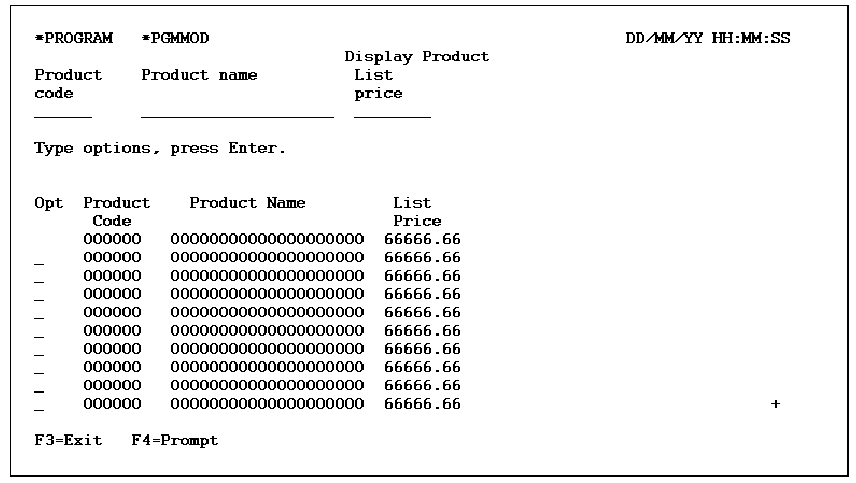
The following table shows the parameters available.
|
Parameters |
Usage |
Role |
Default |
Option |
|---|---|---|---|---|
|
Return code |
B |
- |
Y |
R |
|
Part/fully restricted key |
I |
RST |
– |
O |
|
Key fields |
I |
MAP |
– |
O |
|
Other fields |
Any |
-/MAP |
- |
O |
Any key field defined to the DSPFIL function as an Input/Mapped parameter acts as a positioner for the subfile display. Any non-key field defined as an Input/Mapped parameter acts as a selector for the subfile.
The following table shows the function options available.
|
Options |
Default Value |
Other Values |
|---|---|---|
|
Subfile selection |
Y |
N |
|
Subfile end |
M(YSFLEND |
P,T |
|
Send all error messages |
M(YSNDMSG) |
Y, N |
|
Confirm prompt |
N |
Y |
|
Confirm initial value |
M(YCNFVAL) |
Y, N |
|
Post confirm pass |
N |
Y |
|
If action bar, what type? |
M(YABRNPT) |
A, D |
|
Commit control |
N (*NONE) |
M(*MASTER), S(*SLAVE) |
|
Generate error routine |
M(YERRRTN) |
Y, N |
|
Reclaim resources |
N |
Y |
|
Closedown program |
Y |
N |
|
Copy back messages |
M(YCPYMSG) |
Y, N |
|
Generation mode |
A |
D, S, M |
|
Screen text constants |
M(YPMTGEN) |
L, I |
|
Generate help |
M(YGENHLP) |
Y, N, O |
|
Help type for NPT |
M(YNPTHLP) |
T, U |
|
Workstation implementation |
M(YWSNGEN) |
N(NPT), G(GUI), J(JAVA), V(VB) |
|
Distributed File I/O Control |
M(YDSTFIO) |
S, U, N |
If the DSPFIL function is attached to an CA 2E access path with a multipart key, the display can be restricted on the major key by passing this key as a restrictor parameter. The effect of this on the display is to move the restricted key field(s) and the associated virtuals onto the subfile control and to hide them on the subfile record.
| Copyright © 2011 CA. All rights reserved. | Tell Technical Publications how we can improve this information |