

|
|
|
An EDTFIL function can be attached to a Retrieval (RTV) or a Resequence (RSQ) access path.
If specified in the function options, an EDTFIL function contains calls to the Create Object, Delete Object, and Change Object functions. To remove functions associated with these actions, change the function options. You can also modify the default functions called from the Edit File by editing the action diagram.
For more information on function options, see the chapter, "Modifying Function Options."
If the EDTFIL function is in *ADD mode, an empty subfile appears. If it is in *CHANGE mode, a page of records from the based-on access path appear as modifiable fields. You can change the default function logic for this function type by modifying the action diagram, and changing the function options. In the resultant program, you can alternate between *ADD and *CHANGE mode by pressing F9.
The following is an example of an EDTFIL panel.
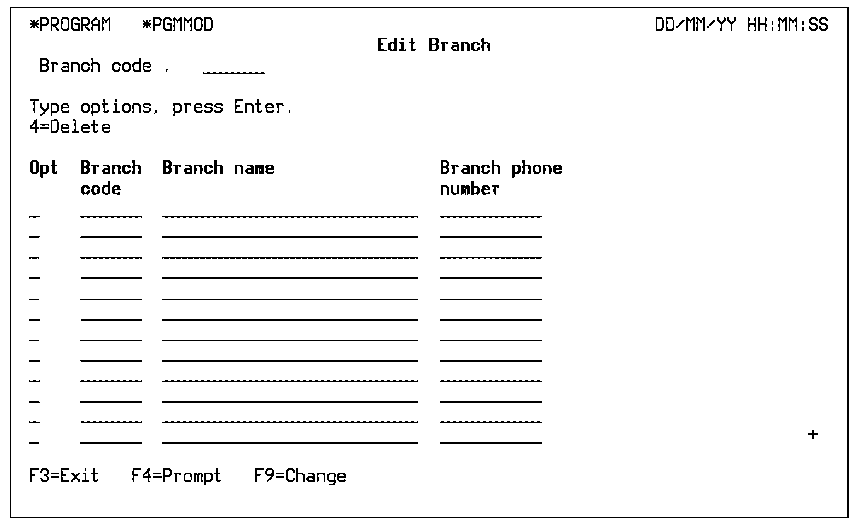
The following table shows the parameters available.
|
Parameters |
Usage |
Role |
Default |
Option |
|---|---|---|---|---|
|
Return code |
B |
- |
Y |
R |
|
Part/fully restricted key |
I |
RST |
– |
O |
|
Other fields |
Any |
-/MAP |
_ |
O |
The following table shows the function options available.
|
Options |
Default Value |
Other Values |
|---|---|---|
|
Create record |
Y |
N |
|
Change record |
Y |
N |
|
Delete record |
Y |
N |
|
Dynamic program mode |
Y |
N |
|
Subfile selection |
Y |
N |
|
Subfile end |
M(YSFLEND) |
P, T |
|
Send all error messages |
M(YSNDMSG) |
Y, N |
|
Confirm prompt |
Y |
N |
|
Confirm initial value |
M(YCNFVAL) |
Y, N |
|
If action bar, what type? |
M(YABRNPT) |
A, D |
|
Commit control |
N(*NONE) |
M(*MASTER), S(*SLAVE) |
|
Generate error routine |
M(YERRRTN) |
Y, N |
|
Reclaim resources |
N |
Y |
|
Closedown program |
Y |
N |
|
Copy back messages |
M(YCPYMSG) |
Y, N |
|
Generation mode |
A |
D, S, M |
|
Screen text constants |
M(YPMTGEN) |
L, I |
|
Generate help |
M (YGENHLP) |
Y, N, O |
|
Help type for NPT |
M(YNPTHLP) |
T, U |
|
Workstation implementation |
M(YWSNGEN) |
N(NPT), G(GUI), J(JAVA), V(VB) |
|
Distributed file I/O Control |
M(YDSTFIO) |
S, U, N |
For more information about:
| Copyright © 2011 CA. All rights reserved. | Tell Technical Publications how we can improve this information |