

|
|
|
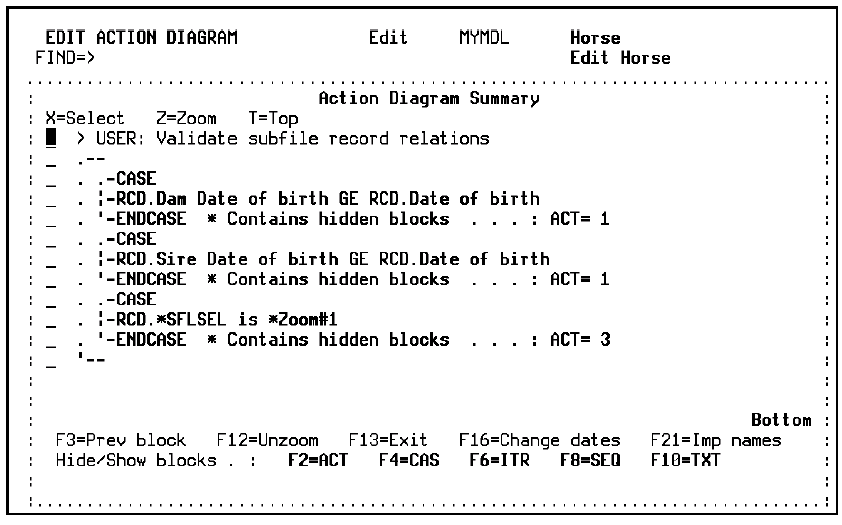
Type V against an action diagram block to view a summary of its contents. The Action Diagram Summary window appears:
Note: You can also access the Action Diagram Summary window using the V option on the User Exit Points window.
The summary lets you quickly select a portion of a large or complicated action diagram for editing. Within the summary, you can easily zoom to a lower level (Z) and select a block for editing (X).
The action diagram is summarized by hiding combinations of blocks. The last line of the summary construct shows the type and number of blocks contained within that portion of the action diagram; for example, the following indicates that the Case block contains three (ACT=3) actions:
_  . .-CASE
_  . |-RCD.*SFLSEL is *Zoom#1
_  . ‘-ENDCASE  * Contains hidden blocks  . . . : ACT= 3
_  ‘--
Use the following function keys to hide or show selected types of blocks
|
Function Key |
Description |
|---|---|
|
F2 |
Hide and show actions |
|
F4 |
Hide and show Case blocks |
|
F6 |
Hide and show Iteration blocks |
|
F8 |
Hide and show Sequence blocks |
|
F10 |
Hide and show Comments |
| Copyright © 2011 CA. All rights reserved. | Tell Technical Publications how we can improve this information |