

|
|
|
Since an internal function cannot be called directly, you need to select an external function that calls it.
Type ? for the Call function option and press Enter. The Select External Function panel displays showing usages for the function you are editing. External functions are highlighted.
Action Diagram Services SYNMDL
Type choices, press ENTER.
Find option . . . . . . . . . : 1 1=Criteria, 2=Error
Occurrences to process . . . . : 1 1=Next, 2=All, 3=Previous
Display find in context . . . : 2 1=Exact, 2=Block, 3=User point
Find function file name . . . : Name, *ALL
Find function name . . . . . . : Name, *ALL
Find field name . . . . . . . : Name, *ALL
Context . . . : Usage . . . : (I/O/B/U)
Search for date . . . . . . . : 5/06/13 CYYMMDD
Compare . . . . . . . . . . . : 1=Less than, 2=Less than or equal to,
3=Equal to, 4=Greater than or equal to,
5=Greater than
Scan in titles and comments . : Ignore case . : Y
Scan for implementation name :
Reset change dates . . . . . . : (Y/N) Share find criteria . . : N
Full screen mode . . . . . . : N (Y/N) Auto-scan functions . . : N
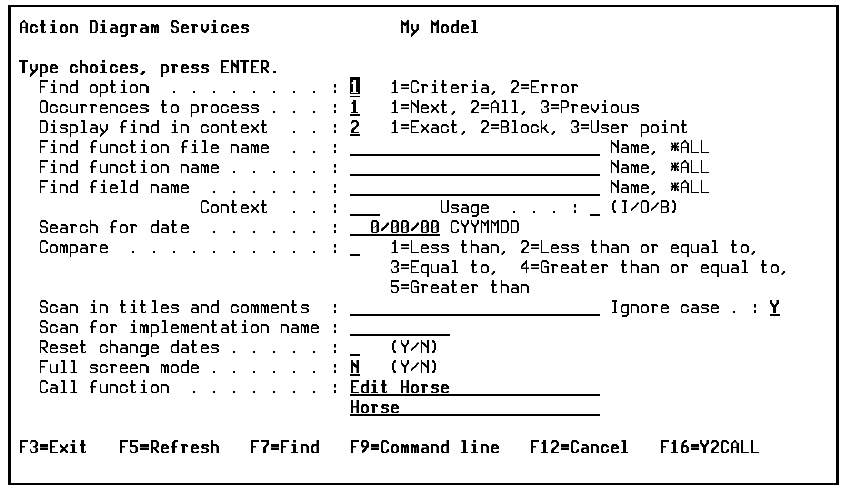
Call function . . . . . . . . : Edit Horse
Horse
F3=Exit F7=Find F9=Command line F11=Conditions F12=Cancel F16=Y2CALL
For more information on use of the function keys for this panel, see the online help.
The Action Diagram Services panel redisplays with the selected function’s name and file displayed for the Call function option.
| Copyright © 2011 CA. All rights reserved. | Tell Technical Publications how we can improve this information |