Modifying Device Designs › Panel Design Elements › Default Layout of a Multiple-Record Panel Design
Default Layout of a Multiple-Record Panel Design
For multiple-record style panels (EDTFIL, DSPFIL, SELRCD), CA 2E lays the fields out on the device display as follows:
- Non-restrictor fields from the format of the based-on access path are placed on each subfile record, one field after another on the same line. Any fields, which are defined as restrictor parameters are omitted from the subfile record and are, instead, placed on the subfile control record.
- Key fields from the access path that are also restrictors are placed on the subfile control record.
- For each key field in the based-on access path, a positioner field is placed on the subfile control record. This field can be used to position the loading of the subfile to start at a particular database record.
- In DSPFIL and SELRCD function types, for each non-key field in the based-on access path, a selector field is placed on the subfile control record. The nature of the selection can be specified using the Edit Screen Entry Details panel.
- Map function parameter fields that cannot be mapped to an existing field are placed on the panel, one field per line, before the other fields.
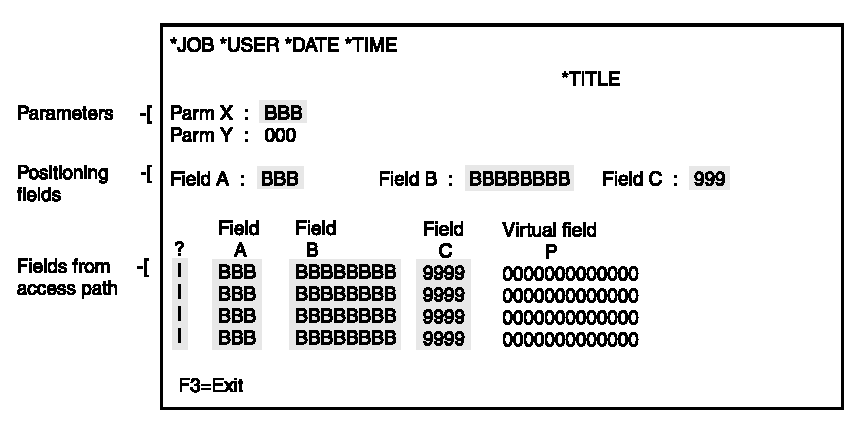
If there are more fields than will fit on a panel, the design can extend past position 80 to 132, provided you have the appropriate terminals. If you require a 132 display, you need to set the function option for 132 on your standard header/footer.

