

|
|
|
OS/400 has several system values available, which can be used to help with internationalization. Store date fields on file in YMD format and convert them to local display format at execution, using the OS/400 QDATFMT and the QDATSEP system values.
For more information on date handling, see the chapter, "General Coding Standards."
You should normally use the system edit codes to edit monetary amounts so that the currency symbol shown is that specified by the OS/400 QCURSYM system value. If you carry out your own editing (for instance, to cater for variable decimal place fields), then you should retrieve the currency symbol from the QCURSYM system value.
Use the system edit codes to edit numeric fields so that the decimal point symbol shown is that specified by the OS/400 QDECFMT system value. If you carry out your own editing (for instance, to cater for variable decimal place fields), you should retrieve the decimal point symbol from the QDECFMT system value.
Use the QIGC system value to condition any special processing required if ideographic support is present. Equally, it can be used to condition special processing only available if ideographic support is not present. For example, there is no support for the DUP key on ideographic workstations.
Use non-alphabetic characters such as @, $, #, carefully, since they are not readily available in some multi-national character sets.
Note: For more information, refer to the information on the QCHRID OS/400 system value for further details.
Collating sequences in different alphabets may be slightly different especially for characters that are not found in the standard English alphabet. This may be significant in inquiry programs that show items in name order. If necessary, alternate collating tables should be used—this will require different sets of logical files in each language version.
Another system-supplied mechanism that can be useful is the translation table. This is a 256-byte table that can be used to control character mapping and usage in various circumstances, for instance in collating sequences, mapping of characters at devices, or translation within a program. Table objects are created from simple source members using the OS/400 Create Table (CRTTBL) command.
Tables can be especially effective when used in conjunction with the system supplied QDCXLATE program, which can be used to translate any character string, using a specified table.
Do not use compile time arrays to hold messages. If for performance reasons you need to hold messages in core storage (for example, because you send them many thousands of times in the course of a typical run), then you should load the messages from an external source at the beginning of the run.
Don’t build up text strings in programs—the syntax rules will be different in different languages. Don’t use text strings as substitution variables in messages for the same reason.
If you have programs that override a display from a system-supplied device file and then process the subsequent output, you should be aware that the output may have a different layout in different language versions of OS/400. You can get around this in one of two ways—either write your program so that it looks for the keywords rather than fixed positions, or ship a copy of the English language file, renamed, and override to that, instead.
There are considerable variations in the standard paper sizes used in different countries. Never hard code the forms length or overflow attributes of a printer file in RPG III programs. Instead, use the values stored as the print file attributes. If necessary, these can be retrieved at runtime from a file information data structure.
To avoid coding text in programs, text can be stored in as messages in a message file and retrieved using the OS/400 Retrieve message (RTVMSG) command. For instance, if you have a CL program that creates an object, it should retrieve the text to be given to the object from a message file:

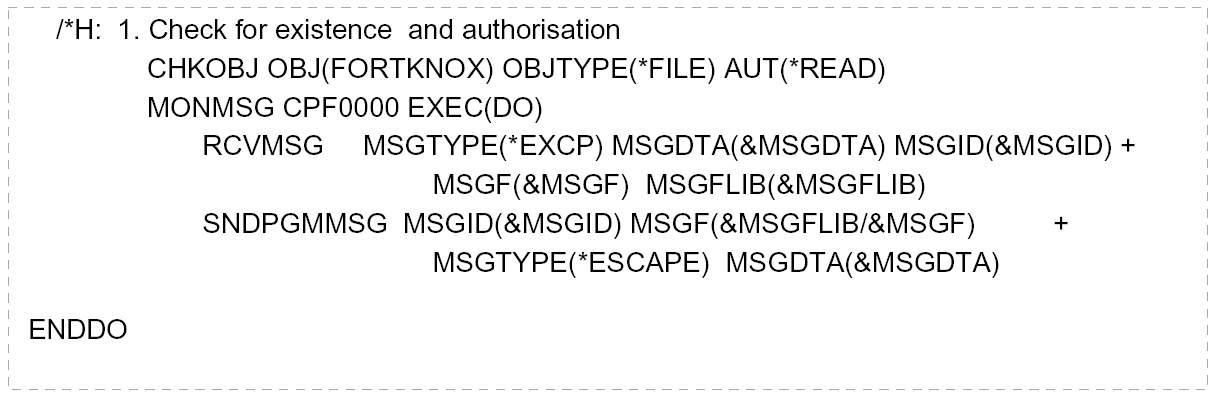
Make use of existing OS/400 messages whenever possible; that way, translation is done for you by IBM. Specifically, use the technique of trapping and resending system and other application’s diagnostic and escape messages, rather than originating your own. For example:
| Copyright © 2011 CA. All rights reserved. | Tell Technical Publications how we can improve this information |