

|
|
|
You can create a new version of a function or message by using the:
The new version will be a copy of the original function or message, but will have a different object name, object surrogate number, and implementation name. The object name for the version must be unique within the owning file; the implementation name must be unique within 3GL object type in the model. The new version is given the Copy name used by the version group to which it belongs.
To create a version from the Work with Versions panel:
Enter selection option 3 for the version you want to use as the source for the new version. You can select any version listed; it does not need to be the current version. The following panel displays:
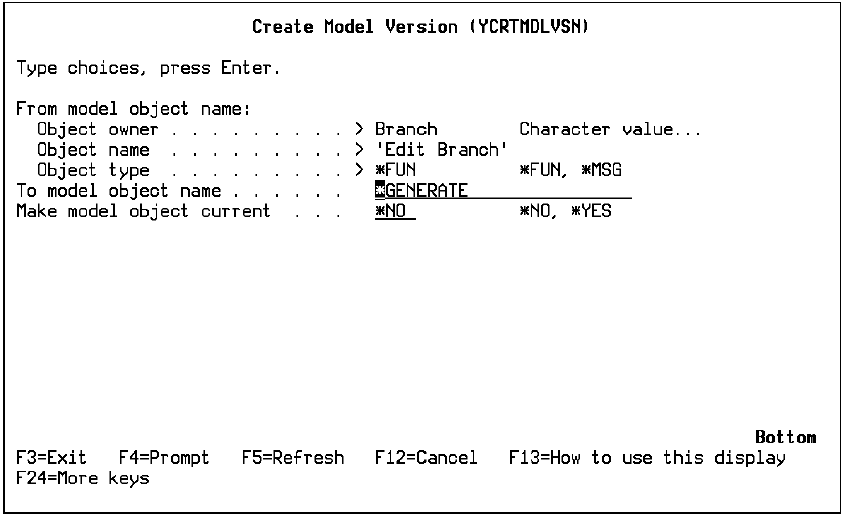
The name CA 2E generates is the original name suffixed by a 7-digit number; the original name is truncated if the new name is longer than 25-characters. For example,
Note: You can define your own naming convention for automatic name generation using the exit program YOBJNAMR1C.
If you do not make the version current at this time, you can do so later using option 26 on the Work with Versions panel or by using the Redirect Model Objects (YRDRMDLOBJ) command.
CA 2E adds the new version to your session list and creates a model object description for the new version. The Copy name assigned to the new version will be the Copy name currently being used for the group to which the new version belongs.
You can view the model object description for a non-current version using selection option 8 on the Edit Model Object List panel when editing your session list or any named model object list containing the version. By default only current versions are displayed when you edit the All Objects list (*ALLOBJ). To display non-current versions, press F17 and set the Current objects only option on the Subset Model Objects panel to *YES.
| Copyright © 2011 CA. All rights reserved. | Tell Technical Publications how we can improve this information |