

|
|
|
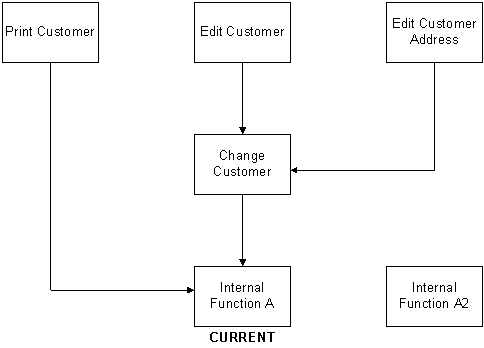
Suppose Internal Function A2, a version of Internal Function A, has been edited and tested and you want to make it current. This diagram shows the other objects in the model that see Internal Function A. Note that no model objects see Internal Function A2.
When you make Internal Function A2 current, all model objects that had referred to Internal Function A are changed to use Internal Function A2. This is shown in the following diagram. Note that other model objects no longer see Internal Function A.
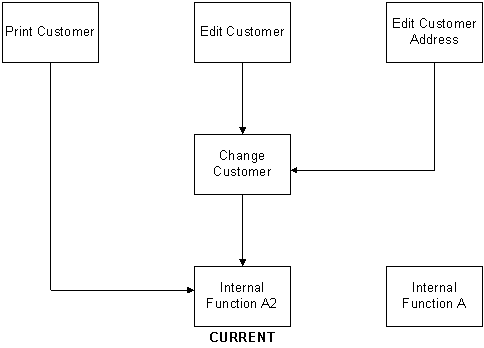
If you find errors in Internal Function A2 you can make Internal Function A current again using the same process.
To make a version current:
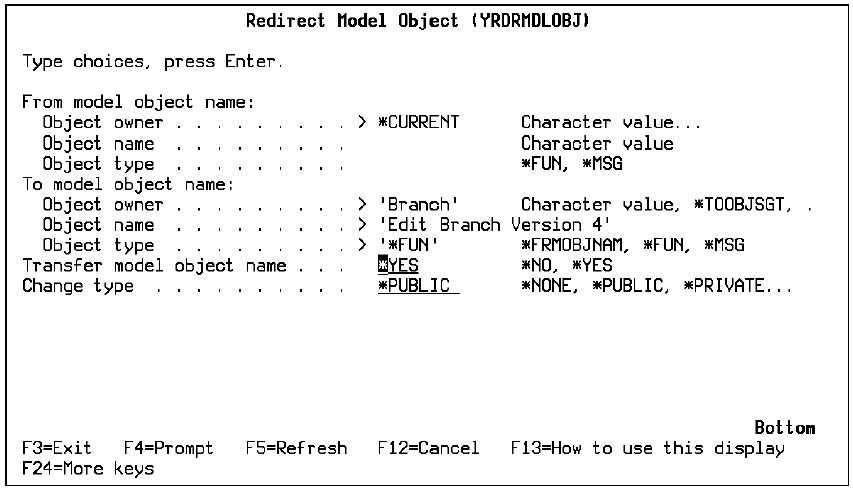
From the Work with Versions panel enter 26 for the version you want to make current or execute the Redirect Model Object (YRDRMDLOBJ) command from the command line. The following panel displays:
Be sure to document the exchange of model object names since this could be confusing to others. Also, note that model object list entries that see these versions are not automatically updated to reflect the exchange of names. You can refresh the affected model object lists by pressing F15 from the Edit Model Object List panel to invoke the Check Model Object List (YCHKMDLLST) command.
You can change the default if you set the Transfer object name option to *NO.
For more information:
| Copyright © 2011 CA. All rights reserved. | Tell Technical Publications how we can improve this information |