

|
|
|
Press F10 from the Edit Model Object List panel to prompt the Execute a Model Object List (YEXCMDLLST) command. This command causes a specified action to be performed on each entry of the model object list. The action can either be a command or a user-defined option.
Note: F10 is not available for the *ALLOBJ list.
The substitution variables listed at the beginning of this section let you symbolically see attributes of the model list entries and pass them to the command or user-option that is to operate on the model object list.
For more information on the YEXCMDLLST command and its parameters, see the CA 2E Command Reference Guide.
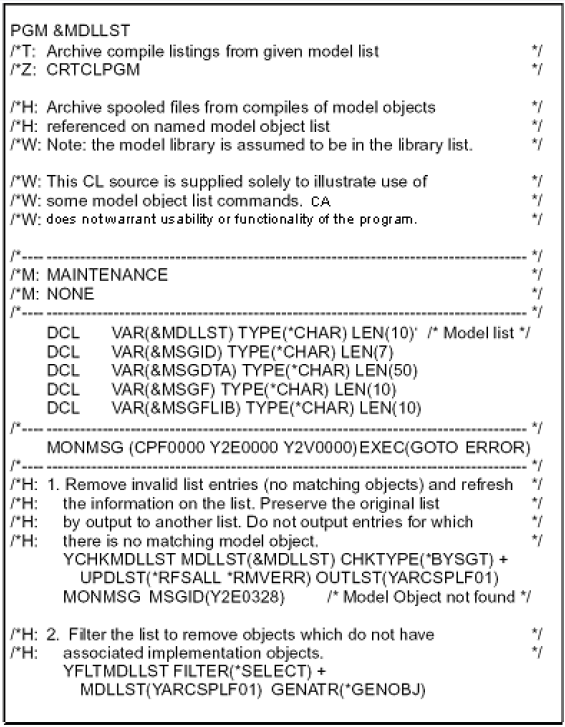
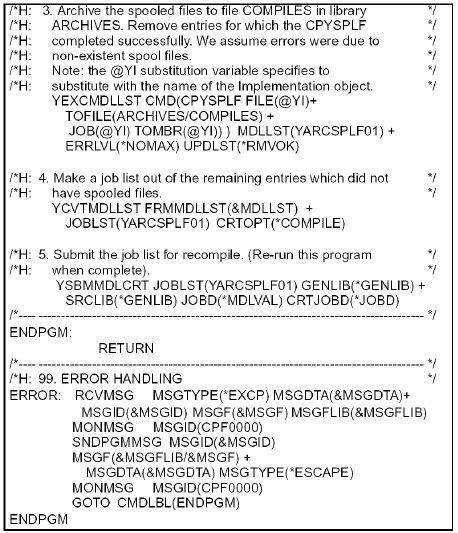
The following is a control language program showing a method of using model list commands, substitution variables, and the YEXCMDLLST command. Note that this is for illustration only and CA does not warrant usability or functionality of the program.
| Copyright © 2011 CA. All rights reserved. | Tell Technical Publications how we can improve this information |