

|
|
|
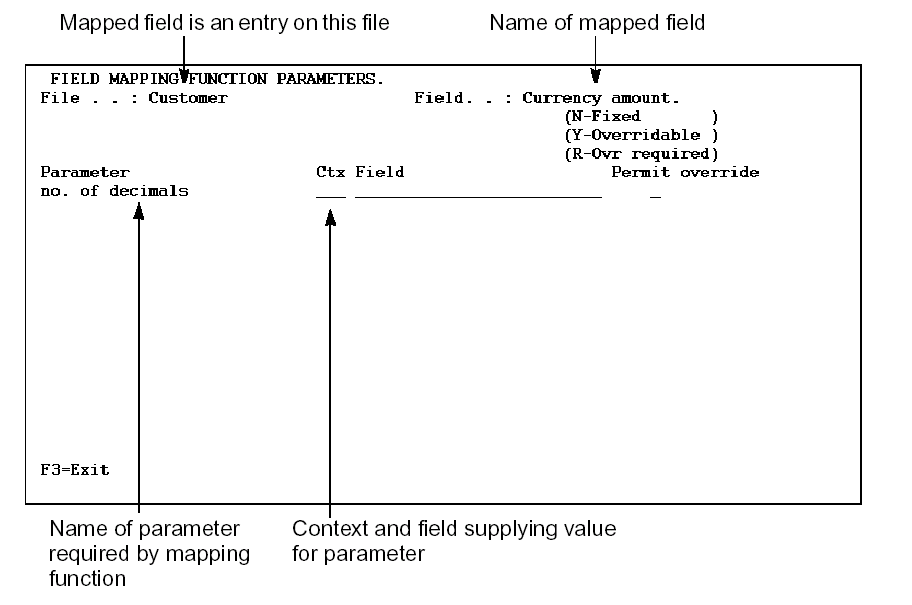
To access this panel from the Edit Database Relations panel, use an E to obtain the Edit File Entries panel to display the entries of the file that has a function containing the mapped user-defined field. Use an M against the entry to set up the additional parameter to the mapped user-defined field type function.
For more information see Displaying File Entries at the beginning of this chapter.
For each mapping function parameter you can enter the context and the name of the field which is to supply the value to the mapping function parameters. This value will be used in all functions based on the file unless it is overridden at the device level.
A special context is available on this panel: FIL. This context indicates that the parameter field is to be found in the same context as the mapped field, wherever it is being used, such as DTL or RCD on a screen, CUR on a report.
You can also specify whether the source of the mapping function parameter is fixed or whether it can be overridden at the panel or report level. The third alternative is to specify that an override is always required.
| Copyright © 2011 CA. All rights reserved. | Tell Technical Publications how we can improve this information |