

|
|
|
When pricing orders, you always want the current price to be used. If product prices do not change every day, each product price record represents not an individual price on a particular day, but a price that is current over a period. When retrieving a price record you do not necessarily retrieve a record exactly matching the date; instead, you want the nearest record. To achieve this, redirect the qualifier reference, using the Display Relation Entries panel. To access this panel, place E0 against the Refers to relation on the Edit Database Relations panel. The following is a sample Display Relations Entries panel.
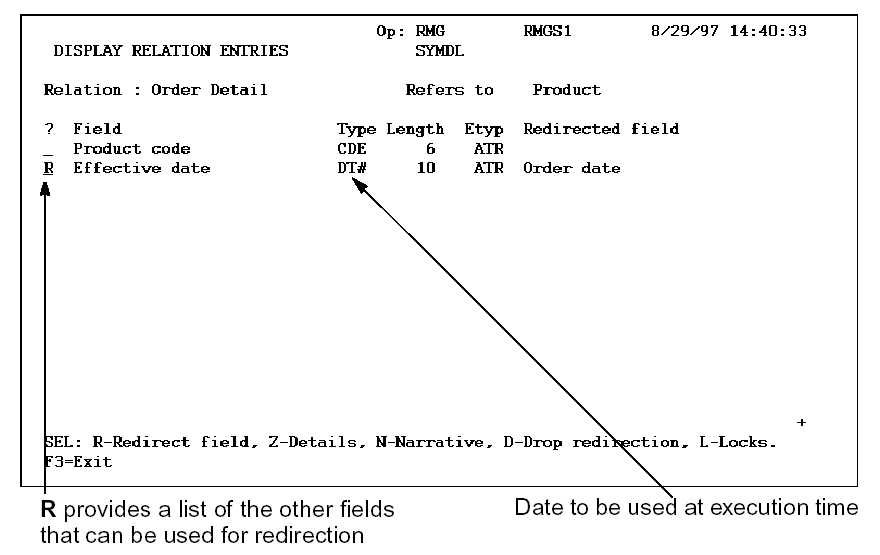
Fields may only be redirected to other fields on the access path that are of the same field type; for instance, both DT# fields.
If Order date is redirected to Effective date, at execution time:
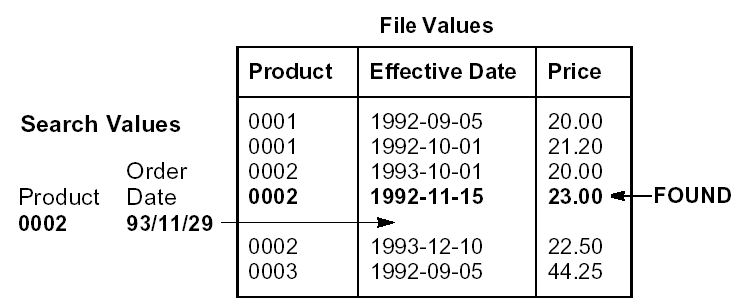
Note that if new price records are added, such as 11/18/93, 22.75, pricing of the existing order is not affected unless it is specifically repriced. However, new orders are priced at the new rate automatically.
Note also that, if product prices change every day, you would not need to redirect the reference since there would be a record present for each product for each date. Each product price would then represent a discrete value rather than a continuum of values.
| Copyright © 2011 CA. All rights reserved. | Tell Technical Publications how we can improve this information |