

|
|
|
You can access the Edit Field Details panel in the following ways:
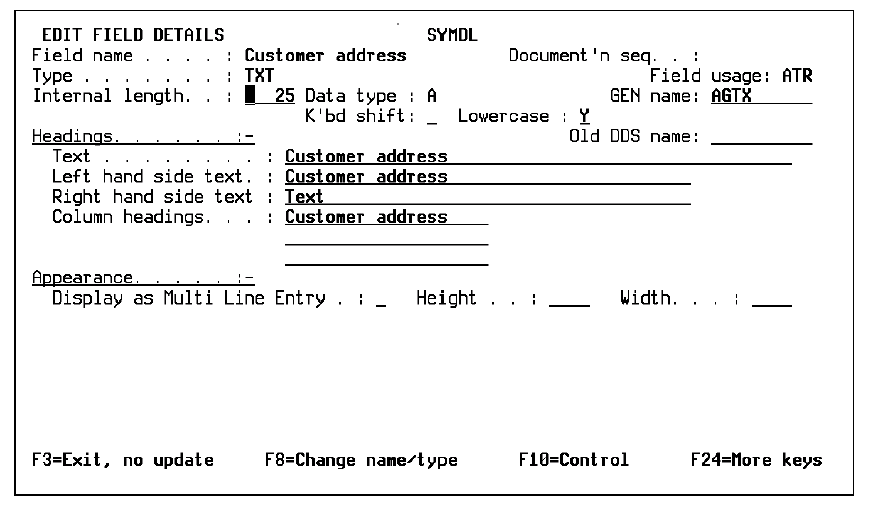
The Edit Field Details panel displays.
The Edit Field Details panel displays.
The Edit Field Details panel allows you to modify field information. The values for the field were originated from default values of the field type. These values can be modified to change the characteristics of the field. The changes you make to a particular field will be available throughout the model.
Press F10 to view the appearance fields instead of the field control information.
The following table lists the overrides for CA 2E default field values for field types.
|
Data Attribute |
Default |
Model Level |
Field Level |
Device Level |
|---|---|---|---|---|
|
Field length System data type Keyboard shift |
By type By type By type |
Y N Y |
Y - N |
N - N |
|
Implementation name Text headings Left hand side text Right hand side text Column headings |
By type By type Field name Field type` Field name |
- - - Y - |
- - - Y |
N Y Y Y Y |
|
Allow lowercase Mandatory fill Valid system name Mod 10/11 check Field exit option |
By type N VNM only N By type |
Y Y Y Y Y |
Y Y Y Y N |
N N N N Y |
|
Check condition Translate values |
By type STS only |
- N |
Y Y |
Y N |
|
Edit codes: Input Output Report |
By type By type By type |
Y Y Y |
Y Y Y |
Y Y Y |
| Copyright © 2011 CA. All rights reserved. | Tell Technical Publications how we can improve this information |