

|
|
|
Use your conceptual model's ERD as a guide to determine the types of relations needed for your model's files, or consult the CA 2E Relation Types charts that follow. The first chart describes the file-to-file relation types and the second chart describes the file-to-field relation types.
The following table contains file-to-file relations.
|
Relation |
Description |
|
Defined as |
Declares that the file exists |
|
Owned by |
Specifies that the keys of the owning file are to become major key fields of the owned by file |
|
Extended by |
Declares the file to have a one-to-one or one-to-none relationship with another file |
|
Refers to |
Causes the key fields of the referenced file to be included as non-key fields on the referring file |
|
Includes |
Causes fields from the referenced file or included structures to be included as attributes in the referencing file |
The following table contains file-to-field relations.
|
Relation |
Description |
|
Known by |
Declares the field to be present as a key field on the file |
|
Qualified by |
Declares a field to be present on a file as a key field; is used with continuous variables |
|
Has |
Declares the field as a data field on the file |
To enter relationships, use the Edit Database Relations panel:
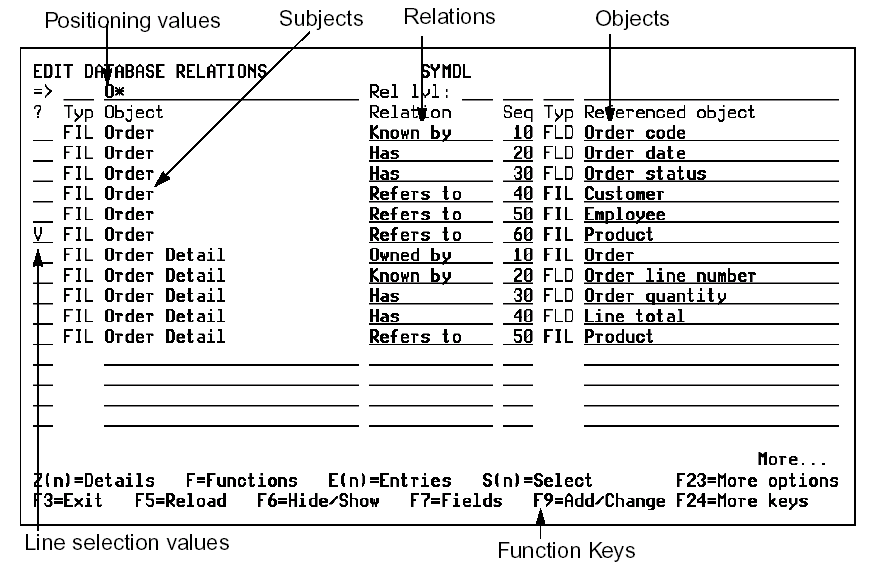
WARNING! Do not use CA 2E shipped fields, those beginning with '*', for defining file-to-field relations.
Define all objects and referenced objects. If you do not define an object or referenced object, CA 2E highlights the name and sends a message letting you know that it needs to be defined.
To define these objects, access the Define Objects panel by pressing F10. The Define Objects panel displays with some information already entered.
For undefined objects, the object type is FIL and the file name is the object name. In the Object attr column, enter the file type (CPT, REF, STR).
For undefined referenced objects:
For the object attribute:
You can use this method for defining files, fields, and relations in combination with other described methods. If you enter all information on the Edit Database Relations panel, CA 2E defaults the values to the Define Objects panel. Complete the definition for the objects on the Define Objects panel.
See the chapter "Understanding Your Data Model" for more information on CA 2E relations and examples.
This topic provides detailed information for working with file entries.
File entries are resolved from CA 2E relations that you use to describe file relationships in your model. An entry indicates the presence of a field on a file. A relation may imply that one or more fields are to be created for your file.
The entries, excluding virtual field entries, indicate the fields to be present in a physical file.
| Copyright © 2011 CA. All rights reserved. | Tell Technical Publications how we can improve this information |