

|
|
|
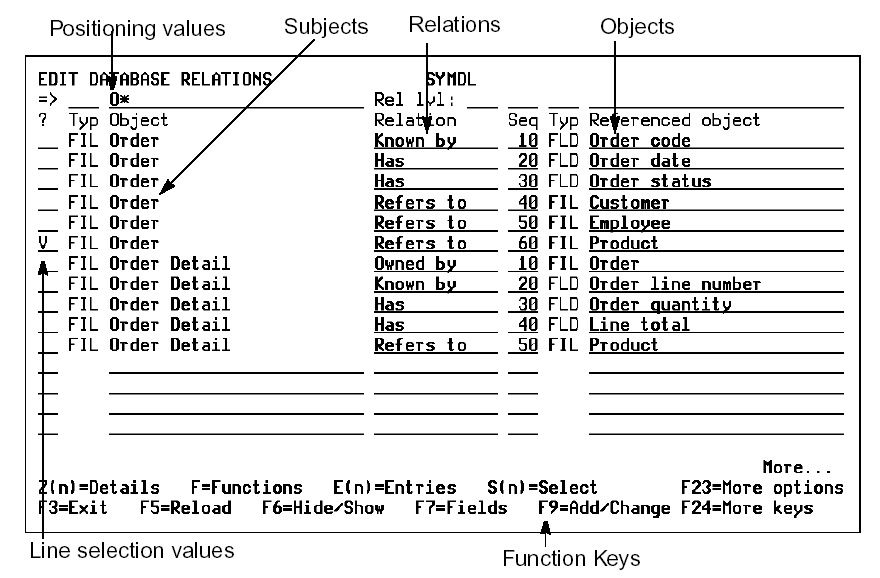
The Edit Database Relations panel allows you to describe your data model to CA 2E. This is your starting point when creating a new data model. From here you can branch off to other areas in CA 2E.
Note: Although you need to use the Edit Database Relations panel to define files and relations, you can also use the Edit Model Object List panel to handle many of the other functions provided by the Edit Database Relations panel.
At the Edit Database Relations panel, you can edit your data model, access information, or navigate through CA 2E by using:
N0, N, N1—narrative for model object
N2—narrative for referenced object; field or file
N3—narrative for Refers to with Sharing Relations. Available only on relations if sharing by an access path (not *None or *All)
Note: Alternatively, you can use model object lists to group together any combination of model object types; you are not restricted to grouping files. In addition, CA 2E provides many powerful tools and commands to operate on model object lists.
| Copyright © 2011 CA. All rights reserved. | Tell Technical Publications how we can improve this information |